

kuttimag86094723
Inspiring
September 22, 2022
Question

Adobe Acrobat DC installation Failed with Error 1311

  • September 22, 2022
  • 2 replies
  • 10569 views

While Updating Adobe Acrobat DC Con in my machine which OS is Windows 10 Enterprise Edition (x64) the installation got failed with Eror 1311 but the File is available in the location. Error SS attached
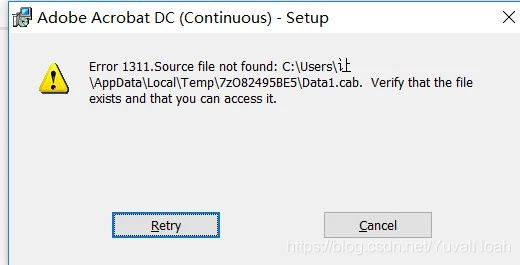
Please provide steps to fix this installation issue since we need proper case solution. Please provide Root cause and Solution for this case.

This topic has been closed for replies.

2 replies

kuttimag86094723
Inspiring
November 8, 2023

As discussed with Adobe Support 


Please perform the troubleshooting as suggested. Uninstall the Acrobat app using above link.

https://get.adobe.com/reader/enterprise/

Once the Acrobat Reader is removed, delete all the Adobe folders from the following locations:

C: Program files > Delete Adobe folder

C: program files > Common files > Delete Adobe folder

C: Program files (X86) > Delete Adobe folder

C: Program X86 > Common files > Delete Adobe folder C: Program Data > Delete Adobe folder

C: User > Username > App data > local > Delete Adobe folder

C: User > Username > App data > local low > Delete Adobe folder

C: User > Username > App data > Roaming > Delete Adobe folder


Once all the Adobe folders are deleted, please reinstall the Acrobat app using below link:

https://get.adobe.com/reader/enterprise/

Inspiring
August 9, 2023

Did you ever get an answer to this? We have the same issue. It should be downloading from AUSST, I don't know why it's missing files

kuttimag86094723
Inspiring
November 8, 2023

Still we didn't get any Response or Solution for this cause.