
Participant
September 18, 2019
Question

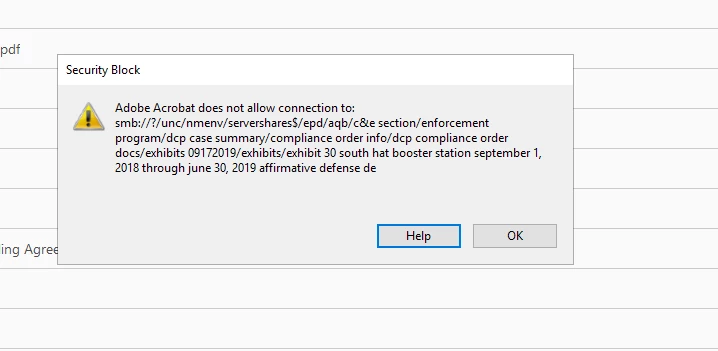
Adobe Acrobat does not allow connection to...

  • September 18, 2019
  • 1 reply
  • 69178 views


I get this message when trying to open an Acrobat file. I have edited the settings in Preferences/Trust Manager/Change settings already. I also tried changing the registry. I can't get this to go away. Any advice is welcome.
 

    This topic has been closed for replies.

    1 reply

    Amal.
    Community Manager
    Community Manager
    September 19, 2019

    Hi Liztapanes,


    Thanks for reaching out. As described above you are getting a pop up "Adobe Acrobat does not allow connection to..." while opening a file, correct?


    • Is this a behavior with a particular file or with any file you try to open?
    • Is the file available locally on your computer or is it on a shared network? Please try to download the file to your computer and try again.


    In the meantime, you may try the troubleshooting steps provided in the link - https://helpx.adobe.com/in/acrobat/using/allow-or-block-links-internet.html and check if that works for you.


    Also, try to add the location of the file and the folder to Adobe Acrobat DC.

    Go to Edit > Preferences > Enhanced security > Add file and Add folder path > Click Ok and restart the application and check. 


    If that doesn't work,


    Please try to turn off the protected view. Go to Edit > Preferences > Enhanced Security  > Turn Off the protected view and uncheck the enhanced security > click OK and restart the application. and check.


    Note: Turning off the security is for testing purpose only, please turn on the security after testing irrespective of the result.


    If turning off the security works for you please refer to the steps provided in the help article - https://helpx.adobe.com/acrobat/kb/protected-mode-troubleshooting-reader.html (steps are similar for Adobe Acrobat DC)


    Let us know how it goes.


    Regards,

    Amal


    Participant
    September 19, 2019
    OK - it is happening on specific files. I looked at https://helpx.adobe.com/in/acrobat/using/allow-or-block-links-internet.html but I have already done this. I added the folder path to enghanced security, turned of protected view, turned off Enhanced Security. I also ran a repair on Acrobat.
    Amal.
    Community Manager
    Community Manager
    September 20, 2019

    Hello,


    As it seems to be a file specific issue, is the file present locally on your computer or is it on a shared network? 


    Pleas try to download the file locally to your computer and try to open. Could you please share the file over a secured  email - doccsup@adobe.com for testing purpose.


    Regards,

    Amal