
Participant
May 17, 2019
Answered

Adobe Acrobat features not showing up in Chrome

  • May 17, 2019
  • 1 reply
  • 2911 views

Howdy!

I uploaded an accessible .pdf as an iframe in Blackboard so my students can view their syllabus in-line.

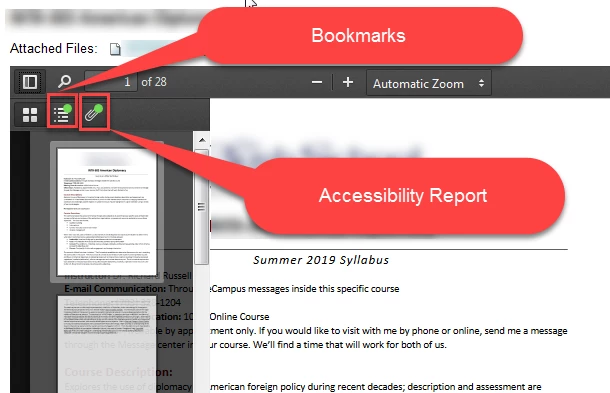
When I use Firefox, I am able to toggle in the upper left-hand corner so I can see the thumbnail view, bookmarks and accessibility report. However, when I view the same file in Chrome, I don't have any of those options.

I'm sure this is a Chrome issue, not an Acrobat issue, but does anyone have a solution so I can access the Acrobat features? Here is a screen shot from Firefox.
This topic has been closed for replies.
Correct answer Meenakshi_Negi

Hello,

The Chrome browser does not support Acrobat any more. When you open the PDF on the browser, Chrome uses its own PDF viewer.

You can either use Firefox to display the Acrobat features or the desktop application to open the document.

For more details, please refer to the following help document:

- Configure browser to use the Adobe PDF plug-in to open online PDF files

- Display PDF in browser Adobe Acrobat, Acrobat Reader

Hope that answers your query.

Let us know if you have any questions.

Regards,

Meenakshi

1 reply

Meenakshi_Negi
Meenakshi_NegiCorrect answer
Legend
May 18, 2019

Hello,

The Chrome browser does not support Acrobat any more. When you open the PDF on the browser, Chrome uses its own PDF viewer.

You can either use Firefox to display the Acrobat features or the desktop application to open the document.

For more details, please refer to the following help document:

- Configure browser to use the Adobe PDF plug-in to open online PDF files

- Display PDF in browser Adobe Acrobat, Acrobat Reader

Hope that answers your query.

Let us know if you have any questions.

Regards,

Meenakshi

Participant
May 20, 2019

Thank you!