
angelos1974
Inspiring
November 7, 2023
Answered

Adobe Acrobat Filter Commenting  options are not working

  • November 7, 2023
  • 7 replies
  • 4728 views

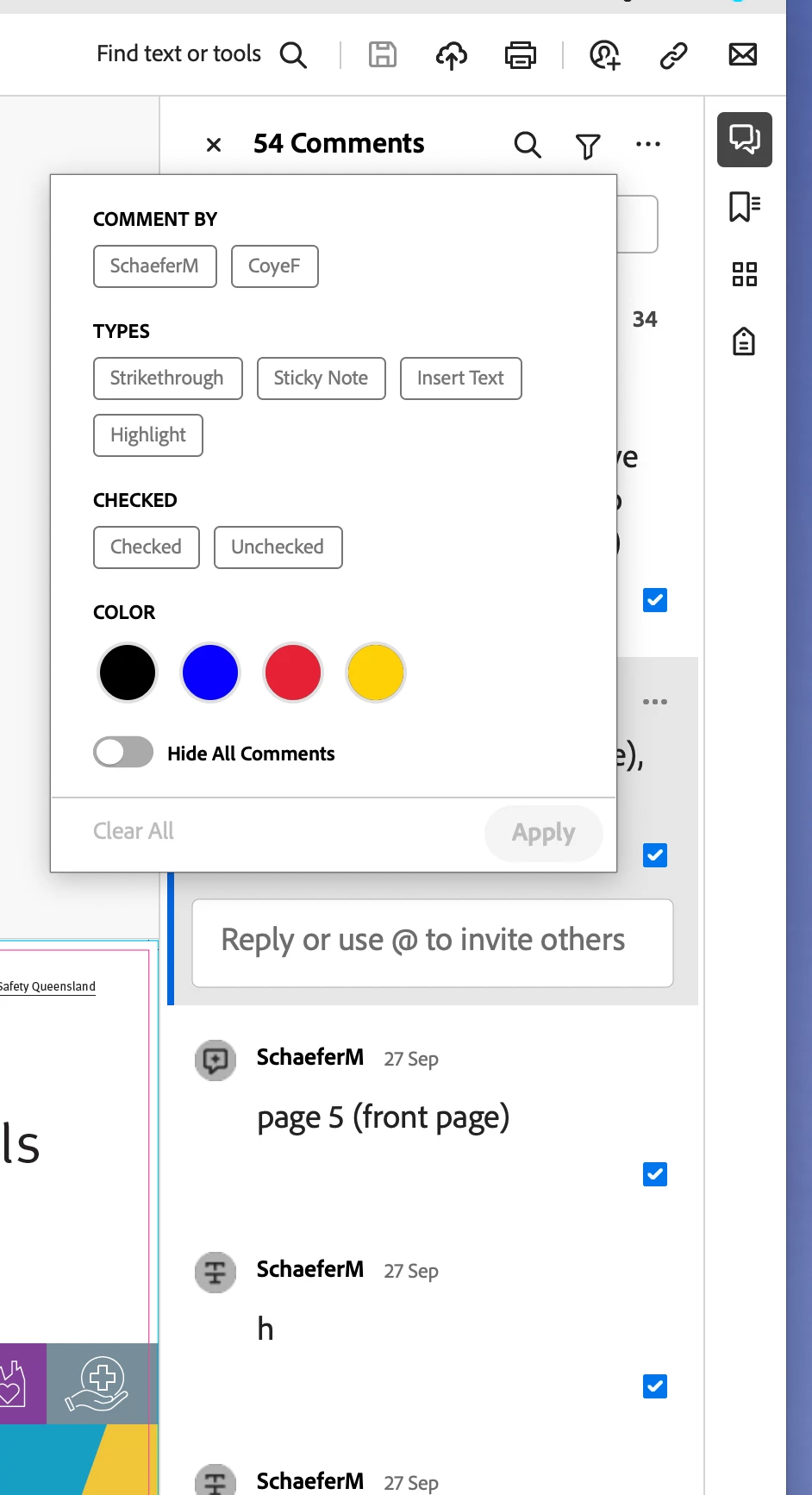
Just did a  system update to the latest verion, Sonoma 14.1 and the Adobe Acrobat Filter Commenting  options are not working. For example after I check comments and go to filter to select for example Unchecked or any of the other options, none of them work.


Does anyone else has the same issue? or any ideas how to overcome this?

thanks in advance!
 

This topic has been closed for replies.
Correct answer angelos1974

Turns out this was a glitch with Apple’s Sonoma 14.1.0.
once updated to Sonoma 14.1.1 the problem was fixed!

7 replies

Participant
August 26, 2024

Same issue here, as of sometime last week. I'm running Sonoma 14.6.1, Acrobat Pro is up to date, and I'm using dual monitors. Very frustrating!

Souvik Sadhu
Community Manager
Community Manager
August 26, 2024

@maryellenc18317757 Would you mind sharing the app version number of Acrobat you are using?


-Souvik

Participant
August 26, 2024

I checked for an Acrobat update before posting here, then about two minutes after posting, I got a Creative Cloud pop-up telling me that an Acrobat update was available. Weird -- it almost seemed like it was triggered by my post. Installing the update fixed the problem. Thanks for your response.

Adobe Employee
August 20, 2024

Hi, @joe336683995s6v 

thanks for reporting this,

Can you please provide the following information:
1. What is the current build that you are using?
2. Are you using dual monitor?
3. Click on Check for Updates.
4. If there is another update, first update and restart the application after quitting, please try to reproduce the same issue and also share the latest build.


Thanks
Harsh

Participating Frequently
August 6, 2024

I've got the same issue. It just started today. I'm on Sonoma 14.4.

Participant
July 30, 2024

This issue just started for me on July 28 2024. i am running Sonoma 14.5

Souvik Sadhu
Community Manager
Community Manager
July 31, 2024

Hi @Joseph388956606r6n,


Hope you are doing well. Sorry for your experience with Acrobat!


Would you mind sharing a few more pieces of information for further investigation:

1. A sample file where you see this;

2. A screen recording of the issue.


Note: If the files have sensitive info, please share them privately. 

[To send a private message, click on my profile picture followed by the blue "Send Message" button on the next page]


-Souvik

Participant
July 31, 2024

Hello,

Thanks for your reply. Unfortunately, my company policy prohibits me from sharing files. Here is a screenshot of the issue.


garethgoneawol
Inspiring
February 8, 2024

This still isn't working and updated to 14.3 now 

angelos1974
angelos1974AuthorCorrect answer
Inspiring
November 22, 2023

Turns out this was a glitch with Apple’s Sonoma 14.1.0.
once updated to Sonoma 14.1.1 the problem was fixed!

Participant
January 18, 2024

THANK YOU FOR THIS! I spent 2 hours with Adobe Support getting nowhere trying to solve why filtering comments stopped working. Finally found this thread and your answer, and lo and behold I updated to Sonoma 14.1 and it now works again. THANK YOU!!

Participating Frequently
January 30, 2024

I'm running Sonoma 14.1 and this is still broken for me. And making my work life miserable as I work through client comments. Argh.

angelos1974
Inspiring
November 21, 2023

Why is Adobe asleep at the wheel?
People have been complaining about this issue for several montha and they are not responding to it.