Participant
March 20, 2025
Answered

Adobe Acrobat Form Help - Autopopulate sums

  • March 20, 2025
  • 3 replies
  • 560 views

Hello!

I am wondering if anyone can help me with setting up a form in acrobat.


I have assigned checkboxes with $ values if ticked. I am then tryin to add a text box to auto calculate by adding in Java Script.


However when i go to Check Box Properties, I cant change the field type to checkbox, and I dont see an Actions tab to select run Java Script.


Any ideas what im doin wrong?


Thanks in advance

Correct answer JR Boulay

"Where do I put the Calculation part?"


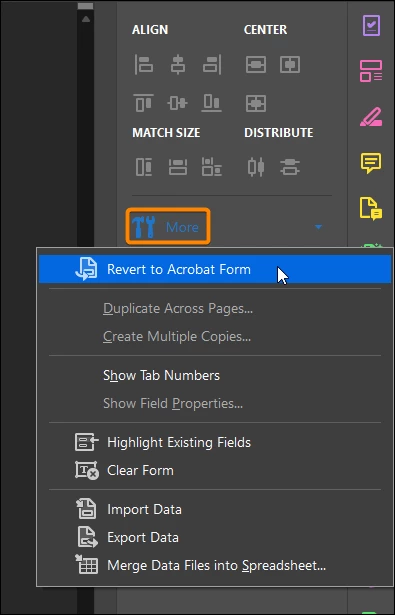
1. Open the "Prepare Form" tools, click the "More" menu and select "Revert to Acrobat Form".

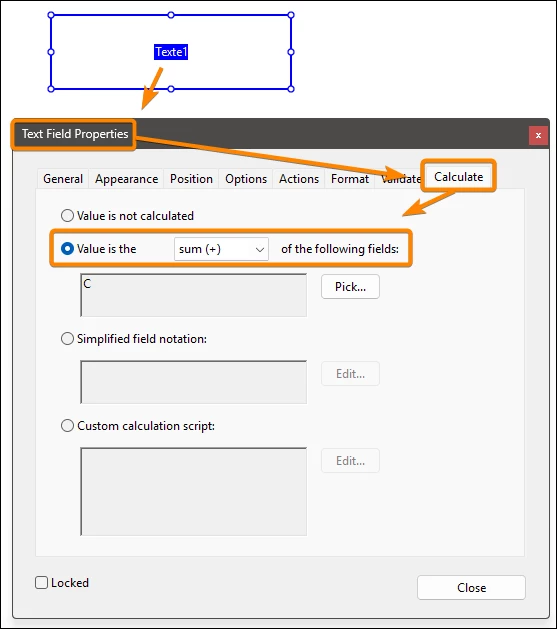
2. Use the "Calculate" tab.


3 replies

Bernd Alheit
Community Expert
Community Expert
March 20, 2025

Actions tab is not available in Adobe Sign forms.

JR Boulay
Community Expert
Community Expert
March 20, 2025

Use : Option : Export value to put a value into checkboxes.

In the TOTAL text field use : Calculation : Sum of

See this sample file: https://acrobat.adobe.com/id/urn:aaid:sc:EU:ce9ac3a2-02c4-4dcc-80e3-06ee944e55b0

Acrobate du PDF, InDesigner et Photoshopographe
Participant
March 21, 2025

Thanks for your reply! Where do I put the Calculation part?


JR Boulay
Community Expert
JR BoulayCommunity ExpertCorrect answer
Community Expert
March 21, 2025

"Where do I put the Calculation part?"


1. Open the "Prepare Form" tools, click the "More" menu and select "Revert to Acrobat Form".

2. Use the "Calculate" tab.


Acrobate du PDF, InDesigner et Photoshopographe
jane-e
Community Expert
Community Expert
March 20, 2025

@alisha_7676 


I've moved your post from Creative Cloud desktop to the Adobe Acrobat forum. 


Jane