
Participant
October 17, 2024
Question

Adobe Acrobat Forms Date format

  • October 17, 2024
  • 1 reply
  • 1601 views

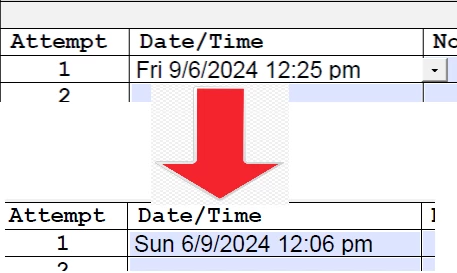
I could not find any previous posts about this:  I have created a pdf form and I need the day date and time on an entry line.  Using DatePickerwWhen formatted as "m/d/yyyy" it comes out okay BUT when I custom format to: "ddd, m/d/yyyy hh:mm tt" it changes the date format to d/m/yyyy. So my entry of Fri, 9/6/2024 10:25 am turns out to be Sun, 6/9/2024 10:25 am. 


Does anyone have a fix for this?  I started and completed this indepth form on 10/10 so I never saw this error until it went live yesterday. 

I have tried restarting Acrobat, I have tried using another PCs with another version of Acrobat, I have created new forms from scratch.  PC date format is standard  ... I am at a loss. 

Any advice is greatly appreciated. 
This topic has been closed for replies.

1 reply

PDF Automation Station
Community Expert
Community Expert
October 17, 2024

Are you trying to use the date picker for the current time of the date selected, or do you just need the date keyed in the format described?  BTW, mm needs to capitalized in the format (MM=minutes, mm=months).

TXforjatAuthor
Participant
October 17, 2024

I am using the date picker for going back in time and chosing the day and then manually adjusting the time.  This is for an audit form that needs to list the day of the week and time of day a service was preformed to ensure compliance.  

My bad on the MM/mm thing in my haste I mistyped it.  Thank you

PDF Automation Station
Community Expert
Community Expert
October 17, 2024

I don't think you can use a date/time format for the date picker.  I developed a date-picker tool long before Adobe added this feature to date format fields.  I just tested it.  You can use the date format of m/d/yyyy and modify the code in the button to achieve, for example,  Thu, 10/17,2024 00:00 am.  The date and day will always be correct but the time will always be 00:00 am.  You can manually adjust the time because the file is not formatted for a date.  The date feeds into the unformatted text field from the popup date picker button.  The tool can be purchased here if you are interested, and I will show you how to modify the button code.