Known Participant
September 12, 2024
Answered

adobe acrobat online missing replace selected text tool

  • September 12, 2024
  • 2 replies
  • 685 views

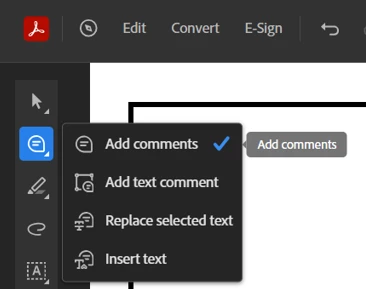
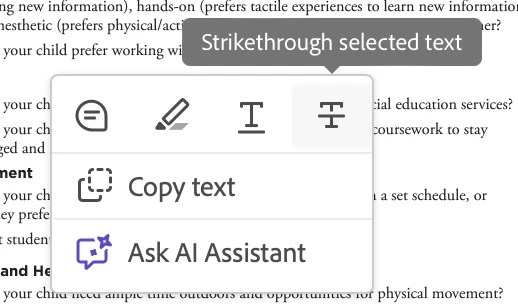
It seems adobe acrobat online is missing replace selected text tool. There's only underline, and strikethrough. I tried the strikethrough and it just comments, and doesn't replace the text when importing the comment in indesign. It was there last weekish...


help?!?
 

Correct answer Meenakshi_Negi

Hi mikejasinski,


Thank you for reaching out.


The option is still available on the Acrobat online account. You may select the options by clicking the comment icon in the tools pane on the floating tool pane at the left. However, the option is not available in the quick selection pop-up. Refer to the screenshot below: 


For more information on commenting PDF, refer to the following help document: https://helpx.adobe.com/document-cloud/help/add-comments.html


Let us know if that helps.


Thanks,

Meenakshi


Marking a reply or response “Correct” will help future users with the same issue quickly identify the correct answer.

2 replies

Participant
April 17, 2025

The Comments icon does not consistently show a dropdown menu for further options like replace or insert. I the triangle indicating the dropdown maybe 1/10 of the time, but even after reloading the page the submenu is just missing. Has anyone discovered how to work around this? Without it the online version is basically unusable if the goal is to get the text changes to appear in InDesign. 

Meenakshi_Negi
Meenakshi_NegiCorrect answer
Legend
September 13, 2024

Hi mikejasinski,


Thank you for reaching out.


The option is still available on the Acrobat online account. You may select the options by clicking the comment icon in the tools pane on the floating tool pane at the left. However, the option is not available in the quick selection pop-up. Refer to the screenshot below: 


For more information on commenting PDF, refer to the following help document: https://helpx.adobe.com/document-cloud/help/add-comments.html


Let us know if that helps.


Thanks,

Meenakshi


Marking a reply or response “Correct” will help future users with the same issue quickly identify the correct answer.