


Participant
January 11, 2023
解決済み

Adobe Acrobat - Permanently Disable Home Screen Feature

  • January 11, 2023
  • 返信数 13.
  • 8590 ビュー

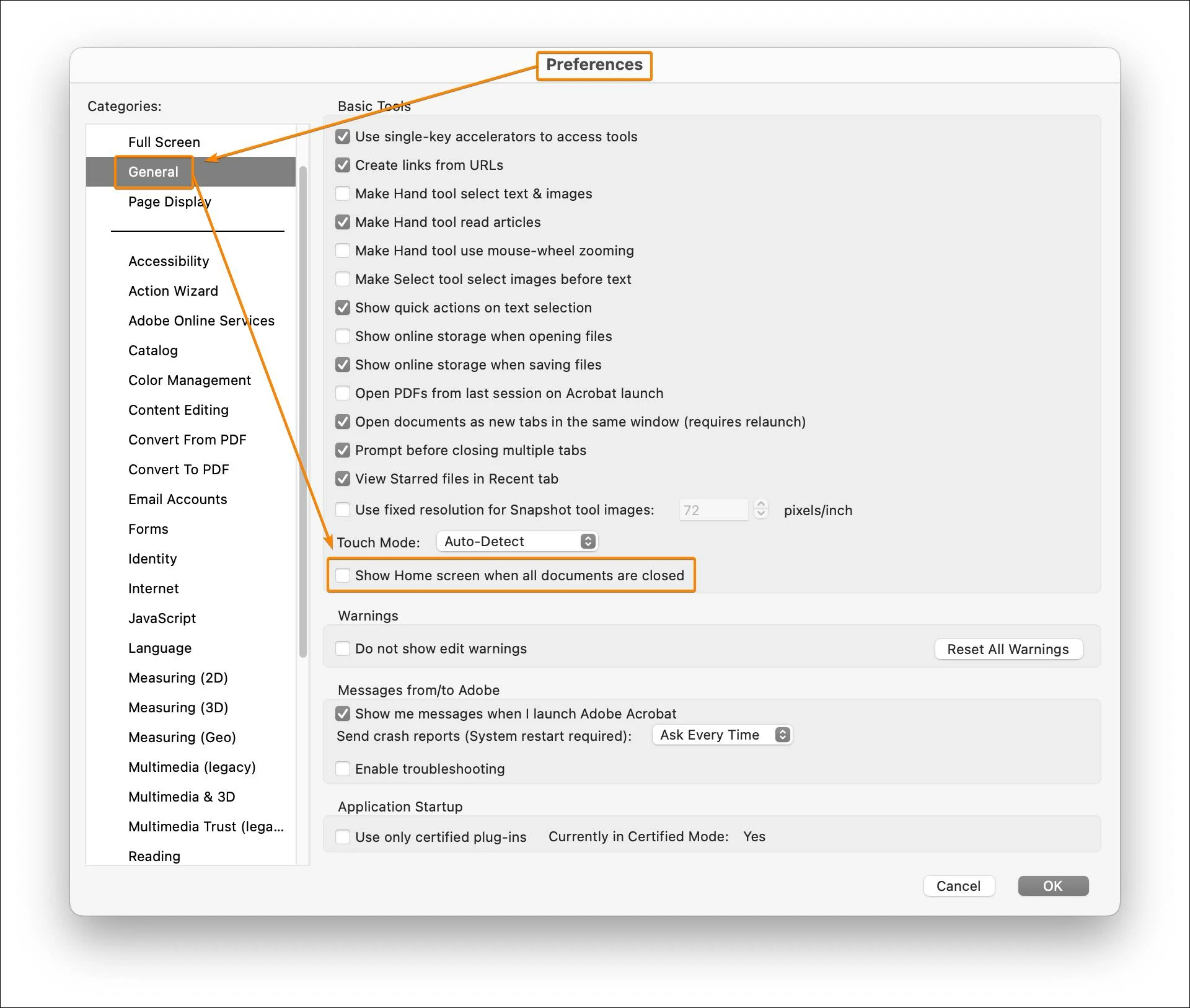
Please describe the exact preference in Adobe Acrobat Pro that permanently disables the Home Screen feature. Please don't send a pointless link to directions that don't solve my problem. Tell me exactly how to disable this pointless and annoying feature.



解決に役立った回答 JR Boulay

Ratushebarl Greg Harbour

Joe26853055d0nb

Simply uncheck this option in the Preferences (macOS only, not available for the Windows version).


返信数 13

Meenakshi_Negi
Legend
January 12, 2023

Hi Joe26853055d0nb,


Thank you for reaching out.


If you are referring to removing the Home page in Acrobat that opens by default when you open the application directly, it is not possible. It is designed behavior.

Let us know if you were referring to some other feature.


Thanks,

Meenakshi 


Known Participant
November 14, 2024

Then it's a stupid design that belongs in Windows 98. The multi-step process for accessing files (if not recent) is also incredibly annoying and counterproductive. A backwards step.


Participant
December 16, 2024

The persistent "Home" screen in Adobe Acrobat is beyond annoying,  it disrupts the workflow and feels absolutely unnecessary. When I close a document, I want the app to close entirely rather than defaulting to the "Home" screen.

I’ve explored the preferences but couldn’t find an option to disable this feature. It would be great if Adobe allowed users to customize this behavior. Adding an option to skip the "Home" screen would improve the experience for many users who prefer a simpler, document-focused workflow.

JR Boulay
Community Expert
Community Expert
January 11, 2023

What do you mean by "Home Screen feature"?

What is it?

Acrobate du PDF, InDesigner et Photoshopographe
Legend
January 11, 2023

No.