edoardog71976745
Participant
October 3, 2023
Answered

Adobe Acrobat preflight not working

  • October 3, 2023
  • 2 replies
  • 1430 views

Hello, our users that are using Adobe Acrobat in a VDI environment cannot use the print production - preflight feature:
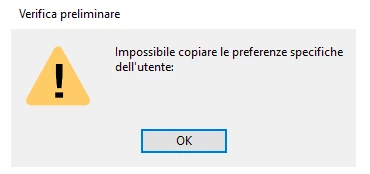
What we have to check?

Thank you

Correct answer Amal.

Hi @edoardog71976745 


Hope you are doing well and thanks for reaching out.


Please try to disable the sandbox feature in Acrobat (under Preferences > Security (Enhanced) > Enable Protected Mode at startup (Preview)). In the case of empty Profiles (or generally), it is advisable to remove the Preflight preferences (%APPDATA%\Adobe\Acrobat\Preflight Acrobat Continuous) to get fresh libraries/profiles after the sandbox is disabled.

Note:

Please keep a backup of the folder before removing from appdata as any custom profiles might get lost during the removal/renaming folder.


Let us know how it goes.


~Amal


2 replies

Participant
March 17, 2024

Resolution : Adobe Acrobat preflight not working on Windows 10/11 : 

Solution Step 1: 

  1. Launch the Adobe DC pro
  2. Click on Edit and then select Preferences
  3. Once the Preferences page has loaded,

  Click on Security(Enhanced) option from the left panel

  1. On the right side on the Security (Enhanced) :
  2. Uncheck the “Enable Protected Mode at Stat up” Checkbox
  3. Set the Protected View to “Off”


Solution Step 2: 

1. If the Preflight profiles are still not loading,

2. Close the Adobe DC pro and navigate to C:\Users\userid\AppData\Roaming\Adobe\Acrobat (replace          userid with user’s actual user ID, e.g., C:\Users\XYZ\AppData\Roaming\Adobe\Acrobat)

  1. Inside this folder, you’ll find a directory named “Preflight Acrobat Continuous.” (Make sure take a back up      before delete)
  2. Delete this folder
  3. Relaunch Adobe DC pro
  4. Once you select the Preflight option, it should load all the profiles should successfully.
Amal.
Amal.Correct answer
Legend
October 3, 2023

Hi @edoardog71976745 


Hope you are doing well and thanks for reaching out.


Please try to disable the sandbox feature in Acrobat (under Preferences > Security (Enhanced) > Enable Protected Mode at startup (Preview)). In the case of empty Profiles (or generally), it is advisable to remove the Preflight preferences (%APPDATA%\Adobe\Acrobat\Preflight Acrobat Continuous) to get fresh libraries/profiles after the sandbox is disabled.

Note:

Please keep a backup of the folder before removing from appdata as any custom profiles might get lost during the removal/renaming folder.


Let us know how it goes.


~Amal