


Participant
September 25, 2025
Question

Adobe Acrobat Pro 2017 deaktivieren

  • September 25, 2025
  • 1 reply
  • 264 views

Ich habe das gleiche Problem wie viele mit dem gleichen Programm: Adobe Acrobat Pro 2017 (kein Cloud-Produkt). Nach der Deaktivierung meiner beiden Notebooks lässt es sich trotzdem nicht auf meinem neuen Notebook aktivieren. Es handelt sich eben um eine Kaufversion.


Bei den Kontaktmöglichkeiten gerate ich immer nur an einen (schlechten) Chatbot. Am Telefon sagte mir eine Mitarbeiterin von Adobe lediglich, es tue ihr leid, dass ich das Produkt nicht nutzen kann.
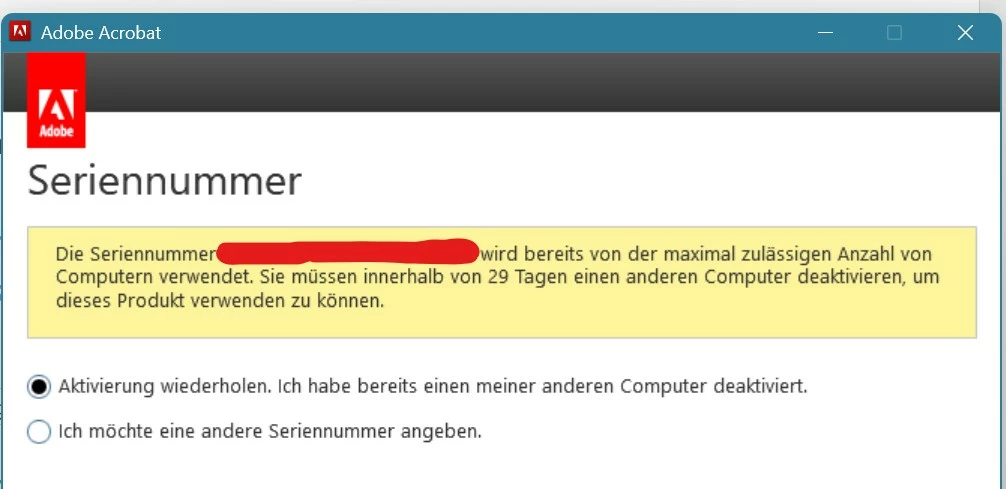


Kann mir hier jemand helfen?

VG
Joules

1 reply

AnandSri
Legend
September 25, 2025

Hello @Melodic_ninja0396


I hope you are doing well, and thank you for reaching out. We're sorry for the trouble you had.


If you still have access to the old notebooks, open Acrobat there → HelpDeactivate (or Sign Out), then uninstall. Reboot both machines. In Acrobat, on the old machines, also sign out of the Adobe account (if signed in). This sometimes helps clear the license association.


On the new notebook: run installer/Acrobat as Administrator

  • Install Acrobat Pro 2017, right-click the setup or Acrobat icon and choose Run as administrator, then enter the serial when prompted and follow activation prompts.

  • Before this, please use the Acrobat Cleaner tool to remove the previously installed app, then restart the machine.
  • Ensure the new machine can reach Adobe activation servers (no restrictive firewall or proxy blocking activation URLs). Temporarily disabling the third-party firewall/antivirus for the activation.
  • You can also try the suggestions from this article: https://adobe.ly/42QhgOn

Please note that these steps may or may not work, as the Acrobat Pro 2017 is now an end-of-support product, and the support for Adobe Acrobat 2017 Classic and Acrobat Reader 2017 Classic ends on June 06, 2022. See this article to learn more: https://adobe.ly/4nOv04m


Thanks,

Anand Sri.

Participant
September 28, 2025

Hallo Anand Sri,

Danke für Ihre Antwort.

Ich habe mich genau an das beschriebene Vorgehen gehalten: Leider noch immer die Meldung, dass die maximale Anzahl erreicht ist. Adobe Acrobat ist jetzt aber auf keinem PC mehr installiert und wurde auf meinen beiden anderen Rechnern deaktiviert und deinstalliert. NUN ist Acrobat auf keinem PC mehr nutzbar.

Haben Sie noch eine Idee? Ich ärgere mich gerade unglaublich über Adobe, dass ein Produkt durch einen fehlerhaften Lizenzierungsserver nicht mehr nutzbar ist. Da zweifle ich sehr, ob ich noch einmal Geld für ein Adobe-Produkt ausgeben werde.

Viele Grüße
Joules

AnandSri
Legend
September 29, 2025

Hello @Melodic_ninja0396


Thank you for sharing the details. Have you tried the suggestions, such as using the Acrobat Cleaner tool and then reinstalling Acrobat? If not, please try and let us know if that doesn't work.

As mentioned above, due to the support limitations, the steps may or may not be effective. But if you wish, I can get a callback arranged from the support team so that they can try to assist you further. If yes, please share your contact details, best time to reach out, and the timezone via Direct message only. Don't post the personal details on the community thread.


To send the direct/private message, please click on my community user profile name, and select message.


Thanks,

Anand Sri.