Participating Frequently
January 14, 2020
Answered

Adobe Acrobat Pro 2017 Question

  • January 14, 2020
  • 1 reply
  • 1134 views

I'm reposting here because I think the first time I posted it may have been in the wrong spot?  Sorry, new to this forum. 


I have Outlook emails that I have converted to pdf (they are bates stamped which means they are numbered) -- now I have to go back and recreate the pdf's using the same emails and they must remain the same length but they are not.


I go into the exact same email and the first time I converted it, the length was 4 pages, now its 5 or the first time its 3 and now its 10.  They have to remain the same size for numbering issues but nothing works (or nothing I can figure out).


Any thoughts or help?  I've also run into it not converting the email at all but giving me a .log file, so yesterday all in all was a fun day!
This topic has been closed for replies.
Correct answer Bernd Alheit


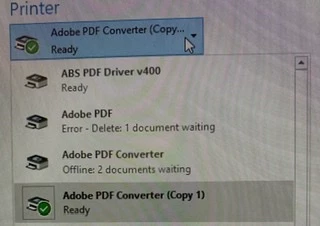
as you can see I now have multiple printers which I can't get out my drop down menu (even though I deleted them from the printer/scanner control).


Why doesn't you use the printer "Adobe PDF" ?

Why doesn't you use the Adobe add-on in Outlook?

1 reply

try67
Community Expert
Community Expert
January 14, 2020

How exactly are you converting the emails to PDFs? Are you using the Adobe PDF printer, or the PDFMaker plugin for Office, or something else?

Participating Frequently
January 14, 2020

File / Print / Adobe PDF Converter 


I even deleted the printer and reloaded it in the hopes that might help.  It didn't.

Bernd Alheit
Community Expert
Community Expert
January 14, 2020

What is "Adobe PDF Converter" ?