Participant
September 30, 2021
Question

Adobe Acrobat Pro 2020 - Prepare form (form field auto detection not working properly)

  • September 30, 2021
  • 2 replies
  • 814 views

Hello, 

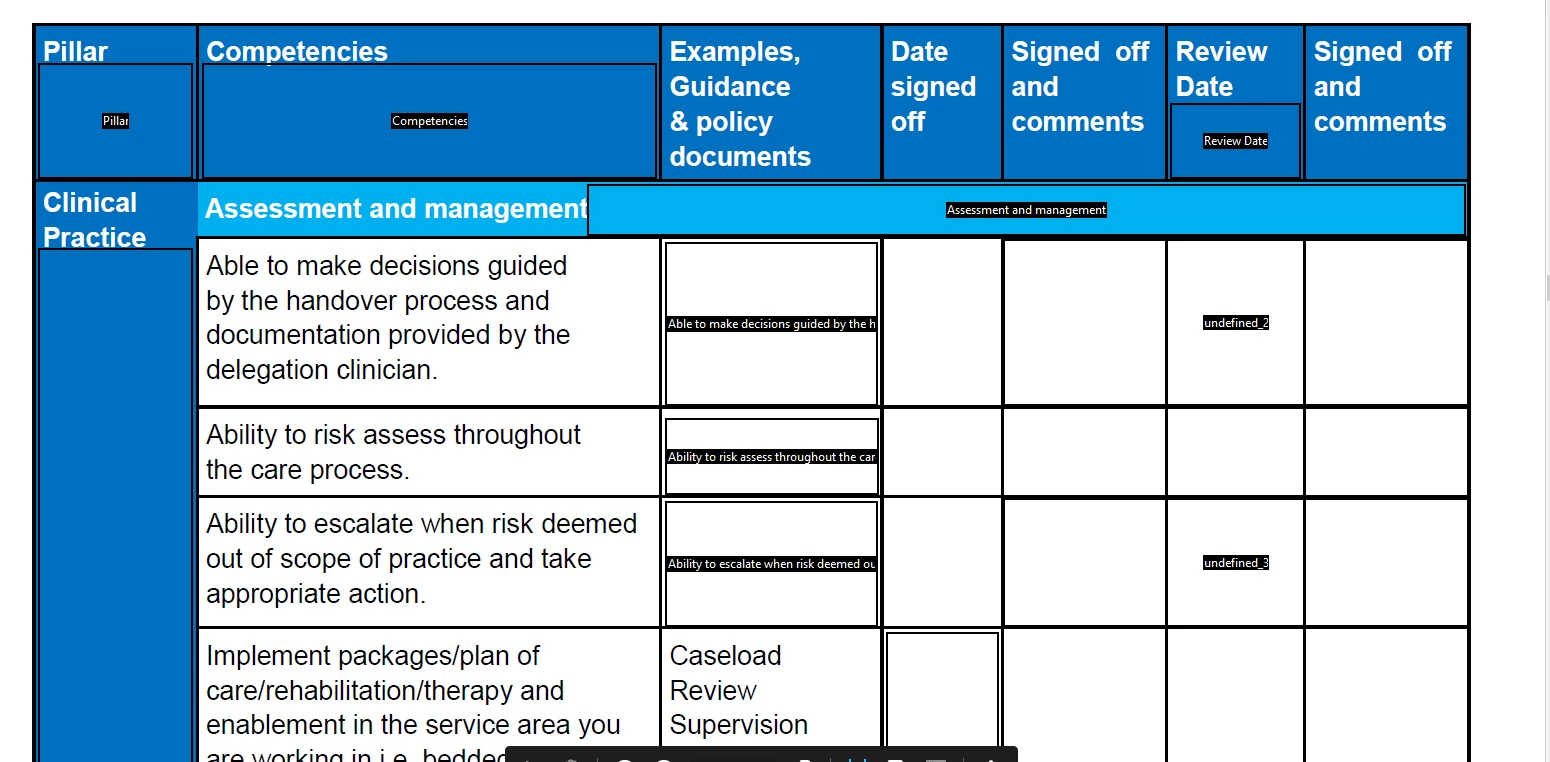
i have a large document i'd like to make into a form, there are alot of boxes so i don't wish to manually create each text field, however it's not detecting every box, (please see image below)

Does anyone have any ideas on how I can fix this issue?


This topic has been closed for replies.

2 replies

try67
Community Expert
Community Expert
September 30, 2021

Unfortunately, not much. The only way to ensure perfect identification of fields is by using a script, and it has to have something it can identify to do so, such as specific characters. For example, I've developed (paid-for) tools that will convert certain Wingdings characters to check-boxes or radio-buttons, and underscores to text fields, but if you use the built-in fields detection wizard the result will never be perfect.


You can find the tools I've created here:

https://www.try67.com/tool/acrobat-reader-convert-wingdings-characters-to-check-boxes-or-radio-buttons

https://www.try67.com/tool/acrobat-reader-convert-underscores-to-text-fields


Bernd Alheit
Community Expert
Community Expert
September 30, 2021

This function is not perfect!