
Participant
November 2, 2021
Question

Adobe Acrobat Pro - copy paste option not available in contextual menu

  • November 2, 2021
  • 1 reply
  • 2543 views

Hi,


could someone explain why Copy option is not available here ( or confirm it's a bug ) :
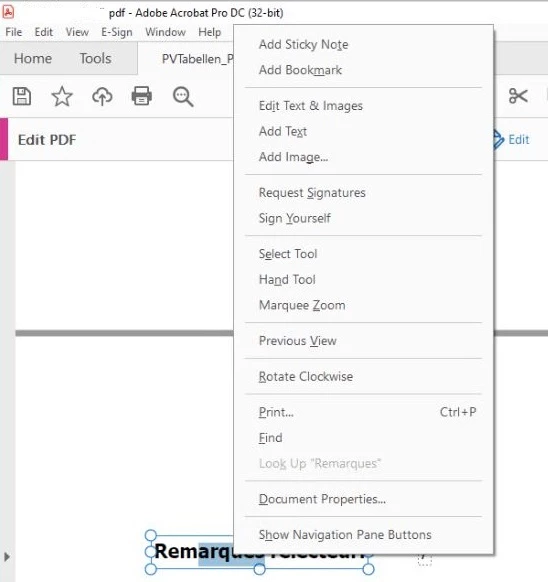
 

content copy allowed in security settings, Ctrl+C / Ctrl+V working fine.


Using adobe Acrobat Pro on Windows 10. 


Thank you,


Marc

This topic has been closed for replies.

1 reply

Amal.
Community Manager
Community Manager
November 2, 2021

Hi Marc


Hope you are doing well and sorry to hear that. As described, copy paste option not available in contextual menu.


Is this a behavior with a particular PDF file or with all the PDFs? Please try with a different PDF file and check.


I have tried to reproduce the issue on my end and its working fine. Please double click on the Word to select it and then right click to get the copy option in context menu also make sure you have the recent version 21.07.20099 installed. Go to Help > Check for updates  and reboot the computer once.


Also try to repair the installation form the help menu (Windows Only) and see if that works.


Regards

Amal


Participant
November 2, 2021

Hi Amal,


thank you for your reply.


As suggested by one of your colleague by mail, I will followup with my test results by email to Adobe Customer Care Team Email Address, if that's ok for you.


Thank you,


Marc

Amal.
Community Manager
Community Manager
November 3, 2021

Hi Marc


That is OK with me as long as you are in touch with Adobe representatives.
Note: Be aware of the spammers and make sure its a genuine Adobe customer care email address ending with Adobe.com


Regards

Amal