
Participant
October 3, 2024
Answered

Adobe Acrobat Pro DC (MAC): No Screen Scale Setting in Preferences

  • October 3, 2024
  • 1 reply
  • 709 views

Hey there

I have Adobe Acrobat Pro DC 2024.001.20604 on a Macbook Pro M3 Pro running macOS Sequoia 15.0.

There is no "Auto Detect for scale for screen resolution" under Preferences -> General Tab (see the attached screenshot).

BTW: I Enabled and Disabled the Modern View from the Toolbar, but no use. The setting is missing from the preferences.
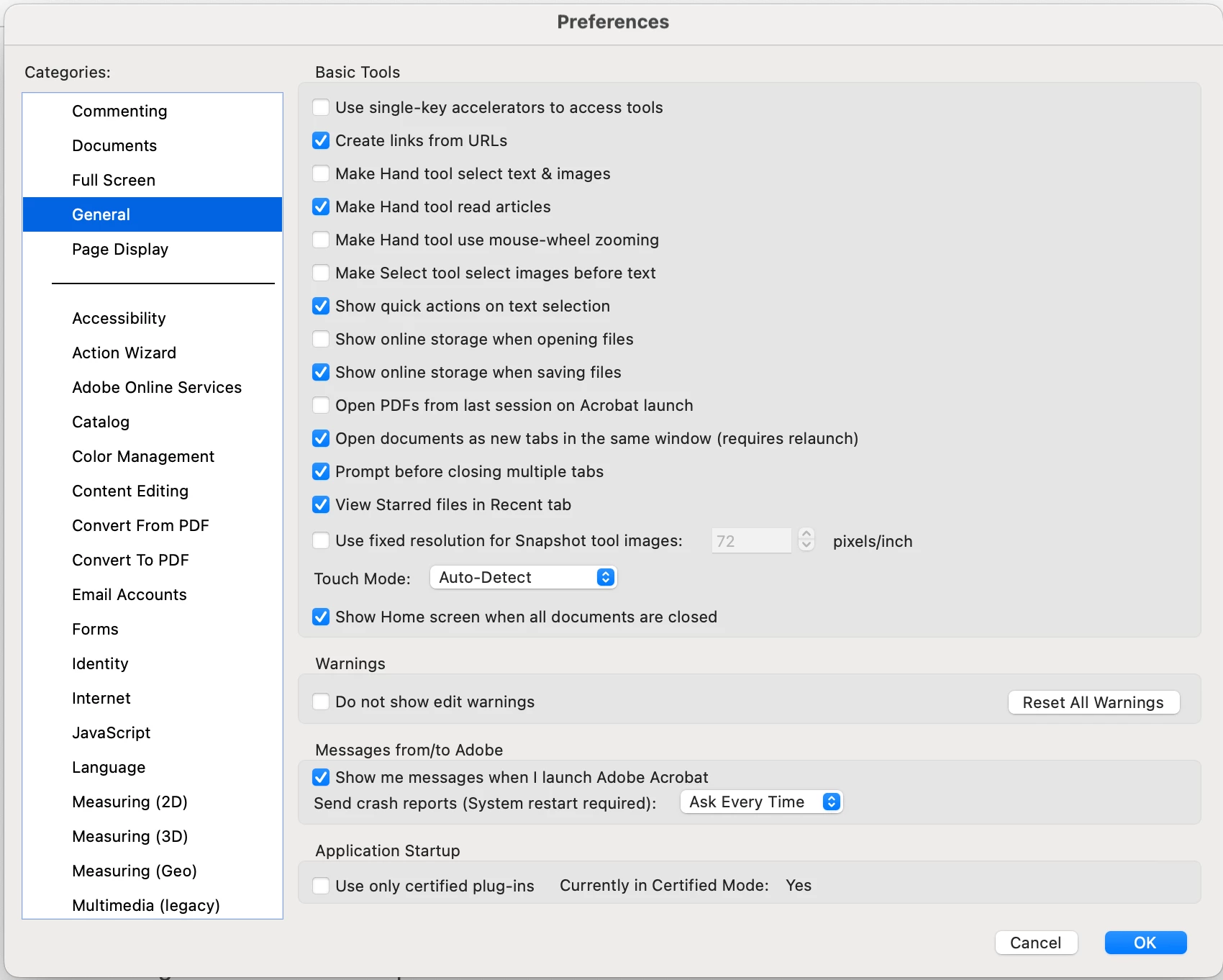
 

Do you know why it's like this and any solution to have the setting back available? 

The app's appearance is not suitable on my screen.


This topic has been closed for replies.
Correct answer S_S

Hi @Aref_80,


Hope you are doing well. Sorry for your experience with Acrobat.


Would you mind updating the app to the latest version(2024.003.20121)? This version has been optimized to provide the best experience for MacOS Sequoia.


You can either update the app by going to Acrobat-> Check for Updates; or from here: 24.003.20121 Optional update, Sep 16, 2024 (Mac only) — Acrobat-Acrobat Reader Release Notes (https://adobe.ly/4es6a5X)


Let me know if you still experience the issue with the latest version, and I will take it up further with the devs.


Thanks,

Souvik

1 reply

S_S
Community Manager
S_SCommunity ManagerCorrect answer
Community Manager
October 4, 2024

Hi @Aref_80,


Hope you are doing well. Sorry for your experience with Acrobat.


Would you mind updating the app to the latest version(2024.003.20121)? This version has been optimized to provide the best experience for MacOS Sequoia.


You can either update the app by going to Acrobat-> Check for Updates; or from here: 24.003.20121 Optional update, Sep 16, 2024 (Mac only) — Acrobat-Acrobat Reader Release Notes (https://adobe.ly/4es6a5X)


Let me know if you still experience the issue with the latest version, and I will take it up further with the devs.


Thanks,

Souvik