

Question
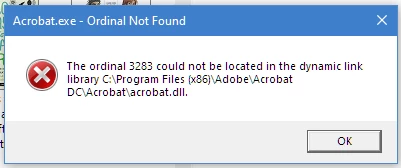
ADOBE ACROBAT PRO DC - Ordinal 3283 could not be located in the dynamic library
Hi,
does anyone know how to fix this error message?
It appears Twice every time I try to open any File Type from Windows Explorer, from any Program or the Internet and this has only started happening after Adobes last Acrobat Pro DC update.
Version: 2021.005.20060
I am a full subscriber to Adobe Creatrive Cloud and any help would be greatly appreciated.
I have uninstalled Acrobat Pro DC and reinstalled but this did not fix the problem.
I am running windows 10 - 64 bit.
Thank you
Cheers Kevin Borg


 AdChoices