Participant
May 2, 2024
Answered

Adobe acrobat pro drawing an arrow fails

  • May 2, 2024
  • 1 reply
  • 1849 views

We open an existing PDF file and go to comments and select the arrow to point to a place on the drawing.   Once the arrow has been placed and you tap off, you no longer see the arrow.   You only see a comment box on the right hand side of the screen or you have to tap on the drawing where you put the arrow and the box will show up.   If we save the drawing, the arrow is not visable to anyone else.  I can open it and say view comments and I see all the arrows they tried to add.   


How do we add the arrows so they are visible on the page, not just in comments?
This topic has been closed for replies.
Correct answer gary_sc

Hi, @Jewls88, I can think of two possible things at first mulling on this, both have to do with the arrow's settings.


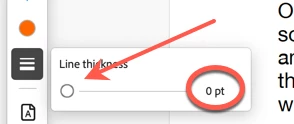
See if you line is set to zero


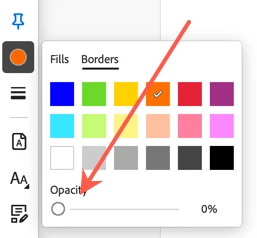
And see  if your opacity is set to zero


When using the old Acrobat interface, after clicking off, I also see NO line with these settings set to zero. On the new user interface, I can almost see a ghost of a line.


Let me know if this solves your problem.

1 reply

gary_sc
Community Expert
gary_scCommunity ExpertCorrect answer
Community Expert
May 2, 2024

Hi, @Jewls88, I can think of two possible things at first mulling on this, both have to do with the arrow's settings.


See if you line is set to zero


And see  if your opacity is set to zero


When using the old Acrobat interface, after clicking off, I also see NO line with these settings set to zero. On the new user interface, I can almost see a ghost of a line.


Let me know if this solves your problem.

Jewls88Author
Participant
May 2, 2024

Thank you - yes, this worked.!

gary_sc
Community Expert
Community Expert
May 2, 2024

Glad to hear that. Which one was it?


Also, extra tip: If you're using the Highlight tool, you will want to drop the opacity to about 50%. Otherwise it will cover over the text underneath.