


Participant
Dec 29, 2024 7:30 PM UTC
Question

Adobe Acrobat Pro Version 2024.005.20320 installed on Mac OS Sequoia 15.1.1

I have the above version of Acrobat instlled on my Mac with OS Sequoia 15.1.1

It will not print any PDF that it opens.  I get a message 
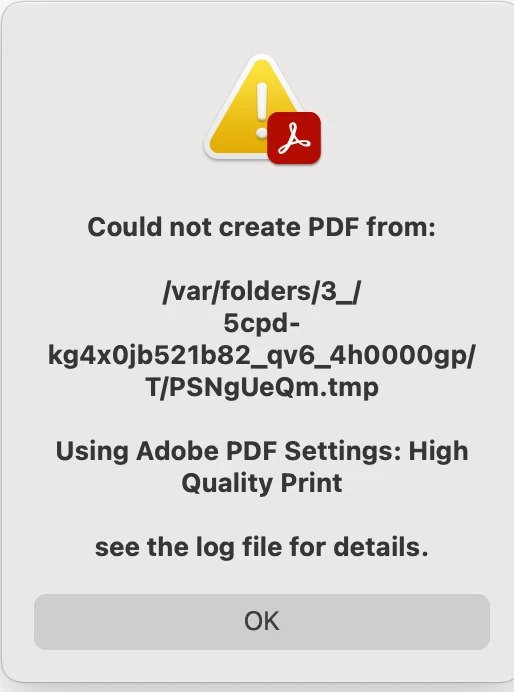
I can print the pdf if I open it in Word.

I have printed from Acrobat in the past but it has stopped.

Any thoughts or assistance would be appreciated.  Trying to call or reach live chat for assistance from Adobe seems impossible.

2 replies

Karl Heinz  Kremer
Community Expert
Community Expert
Dec 30, 2024 1:45 PM UTC

The error message suggests that you are trying to create a PDF file. Are you trying to print a PDF file to an actual printer? 

Also, as far as I know, you cannot open PDF files in MS Word (it will convert the PDF to the Word format). 

How exactly are you trying to print your PDF file? What printer do you have selected? 

Translate
Participant
Jan 8, 2025 8:38 PM UTC

.I use an iMac, 24-inch, M1, 2021, OS Sequoia 15.1.1.  I have a PDF file that is a PDF file type in Finder. When I click it it automatically is opened by Adobe. I Hit Command P to print and get the message above.  I go to the same file and Open with Microsoft Word and it opens and prints by hitting Command P.  The Printer is a HP Color Laserjet Pro MFP M283fdw.  It is directly connected by cable to the computer.  I think that all of your questions are answered.

Translate