matua
Participant
January 8, 2026
Answered

Adobe Acrobat Reader for macOS 26?

  • January 8, 2026
  • 2 replies
  • 391 views

Dear community, 


after downloading the free version of Acrobat from https://get.adobe.com/uk/reader/otherversions (which took many attempts, falsely claiming internet connection issues), the .dmg can't be opened (The disk image couldn’t be opened … Operation not permitted). Terminal explains: 


DIBackingStoreInstantiatorProbe: interface  0, score     100, CBSDBackingStore

DIBackingStoreInstantiatorProbe: interface  1, score   -1000, CBundleBackingStore

DIBackingStoreInstantiatorProbe: interface  2, score   -1000, CRAMBackingStore

DIBackingStoreInstantiatorProbe: interface  3, score   -1000, CDevBackingStore

DIBackingStoreInstantiatorProbe: interface  4, score   -1000, CCURLBackingStore

DIBackingStoreInstantiatorProbe: interface  5, score   -1000, CVectoredBackingStore

DIBackingStoreInstantiatorProbe: interface  0, score     100, CBSDBackingStore

DIBackingStoreInstantiatorProbe: interface  1, score   -1000, CBundleBackingStore

DIBackingStoreInstantiatorProbe: interface  2, score   -1000, CRAMBackingStore

DIBackingStoreInstantiatorProbe: interface  3, score   -1000, CDevBackingStore

DIBackingStoreInstantiatorProbe: interface  4, score   -1000, CCURLBackingStore

DIBackingStoreInstantiatorProbe: interface  5, score   -1000, CVectoredBackingStore

Attaching…

Error 1 (Operation not permitted).

Finishing…

DIHLDiskImageAttach() returned 1

hdiutil: attach failed - Operation not permitted


Now, on said page, the most recent OS to be chosen is MacOS 15.x (Sequoia), which is the one preceding 26 (Tahoe). Not sure if that's the reason. Any idea?


Thanks!

Correct answer creative explorer

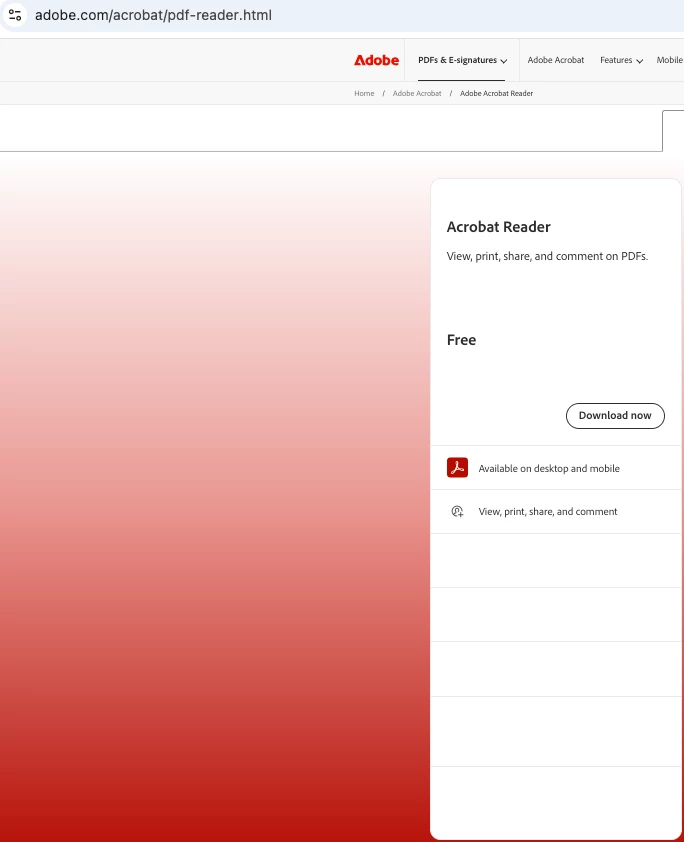
@matua have you just try: https://www.adobe.com/acrobat/pdf-reader.html and click on Download Now? It will download whatever your OS is for you:

creativeexplorer_0-1767908704929.png


2 replies

creative explorer
Community Expert
creative explorerCommunity ExpertCorrect answer
Community Expert
January 8, 2026

@matua have you just try: https://www.adobe.com/acrobat/pdf-reader.html and click on Download Now? It will download whatever your OS is for you:

creativeexplorer_0-1767908704929.png


m
Amal.
Legend
January 8, 2026

Hi there,


Hope you are doing well and sorry to hear you're running into this.


From what you've described, there are a couple of likely causes:


1. macOS Version Compatibility

You mentioned you're on macOS 16 (Tahoe), but the Reader download page only lists up to macOS 15 (Sequoia). If you're running the newest macOS release, there's a good chance the current Adobe Reader .dmg isn’t marked as compatible yet, which can lead to the “Operation not permitted” mount failure.

This does happen briefly after new macOS releases until installers are updated.

2. macOS Security / Gatekeeper Blocking

macOS can also block disk images that aren't notarized for the current OS. This can trigger the exact behavior you’re seeing, especially with “Operation not permitted”.

You can check Security settings here:
System Settings > Privacy & Security
Look for:

“AdobeReader.dmg was blocked…”
and allow it if present.

Things you can try:
1. Re-download from the new unified installer link https://adobe.ly/49uS5DO and see if that helps.


2.  Allow Gatekeeper manually

Try opening via right-click:

Right-click .dmg → Open

If prompted, choose Open again

If Terminal still fails, the disk image likely isn't compatible.

Since Tahoe (macOS 16) is very new and Reader currently lists up to macOS 15, it’s highly likely the installer simply isn’t supported yet.


Hope this information will help.


~Amal