Participant
June 30, 2022
Question

Adobe acrobat reduce file function is not working

  • June 30, 2022
  • 2 replies
  • 409 views

My acrobat reduce file function is not working!

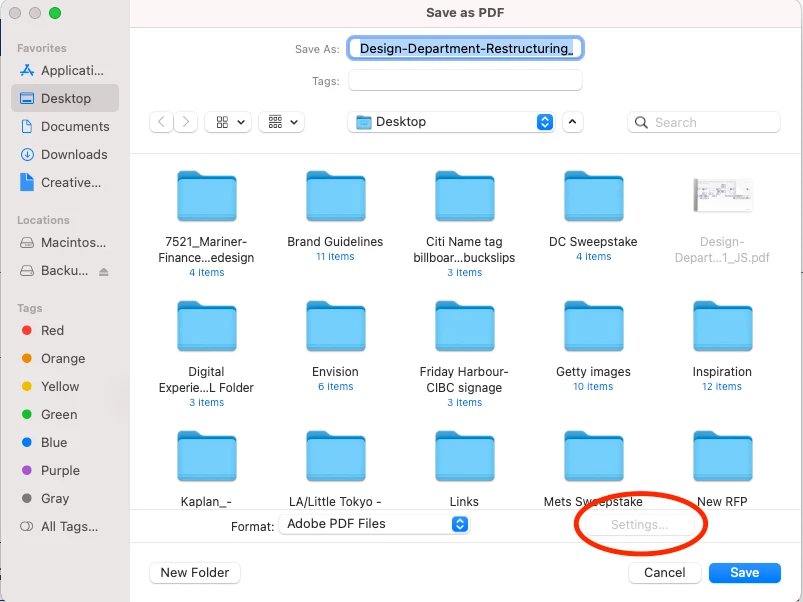
I go to File -> save as, it shows the picture below, there is no options for optimized PDF and the seeting button is off. I tried File -> reduce file size, it's the same result, there is no other format can choose.


The Acrobat pro Dc is version 2022.001.20142, the latest version. I uninstalled and installed Adobe acrobat and restart my Mac pro, but nothing changes. Everything was ok, never happened this before.

Does anyone have the same problem? Or anyone who knows how to fix it? 

Thanks in advance. 
 

This topic has been closed for replies.

2 replies

gary_sc
Community Expert
Community Expert
July 1, 2022

Hi Yi Ting,


That settings button is greyed out because there are no actual "settings" for that operation. For example, you want a reduced-sized PDF; when you do that, there are no real options to change to fine-tune your choices.


Now, that's not entirely true because you can set the compatibility for the reduced size by doing this:


First, select Reduced Size PDF from the Save as Other choice.

After selecting that, you will get a Settings option, but it's not all that functional for most folks:


S_S
Community Manager
Community Manager
June 30, 2022

Hello,


I hope you are doing well. I am sorry for your experience.


From the screenshot, are you trying to use the save as an option for a PDF file or any other file type?

If it is for a PDF file, you won't get the settings option as there will be nothing to write over from a PDF to a PDF. You can try changing the Format to PDF, Optimized, or any other from the dropdown list, and you will see the settings button activated again.


Let me know if it helps.


Thanks,

Souvik.