1 reply

Meenakshi_Negi
Legend
April 9, 2025

Hi HBXL 5EFD,


Thank you for reaching out.


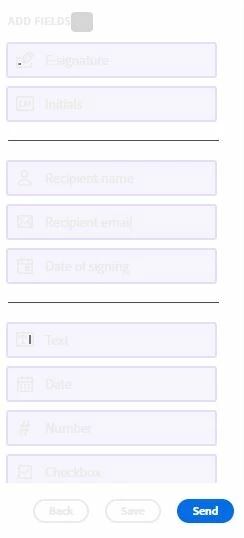
Please let us know if the field options only show as light in color. Are you able to select fields without any issues?

Could you please let us know if you are using the Acrobat desktop application or the Web application to send the document for signature? 

In the meantime, we will check with the team.


Thank,

Meenakshi

HBXL 5EFDAuthor
Participant
April 9, 2025

Using the web application.

And its only the fields I spotted are greyed out, but they are accessible (I can place them where I need them and they appear to work). I just cannot read them unless I put my nose right against the screen, its like super light grey font colour .
I didnt include sensitive info in my image but to add, the two address fields (sign and co-sign individuals), their details were dark grey box with clear writing in it - I had no trouble seeing the individuals that sit just above the field selection pane

HBXL 5EFDAuthor
Participant
April 9, 2025

BTW, my computer isnt set to dark mode or anything like that either. All other font colour is normal.