
Participant
May 22, 2024
Question

Adobe Acrobat - Unable to delete/edit comments

  • May 22, 2024
  • 1 reply
  • 1460 views

A user has found their comments have become corrupted and can't be deleted nor edited. When deleting them, either through the menu or the comment itself, and saving the document, when reopened the comments are still there.


I have tried repairing Adobe Acrobat, both through Windows settings and the application itself. They are on the most recent version of 2024 Adobe Acrobat.


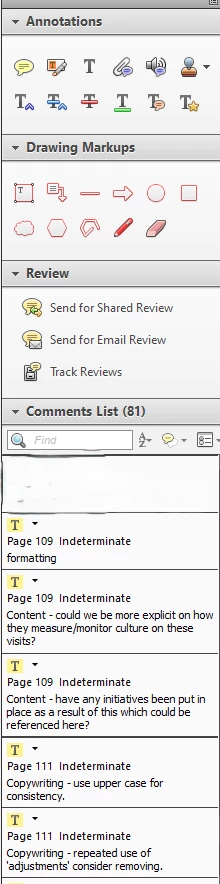
The comments are clearly corrupt as they have no author and the timestamp is "indeterminate". However there is no way to change the content or delete them.


See attached image for an example:
 

This topic has been closed for replies.

1 reply

Amal.
Legend
June 5, 2024

Hi there


Hope you are doing well and thanks for reaching out.


Is this an isue with a particular PDF file or with all the PDFs? Please try with a different PDF file and check.  If the file is stored on a shared network/drive please download it to your computer locally and then try again.


If its a file specific file, please share it with us for futher checking.


Also, make sure you have the recent version 24.02.20759 installed. Go to Help > Check for updates and reboot the computer once.


~Amal