


Participant
Oct 2, 2025 4:55 PM UTC
Answered

Adobe Acrobat unable to open any PDF files after clicking Cancel on a password protected file

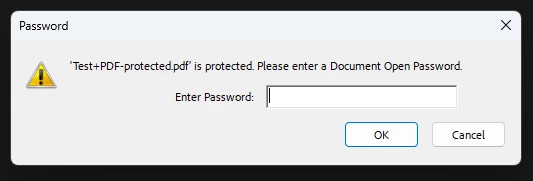
When I open any password protected pdf files to Adobe Acrobat, it prompts for the password.

If I click "Cancel" and try to open another PDF file, nothing happens.


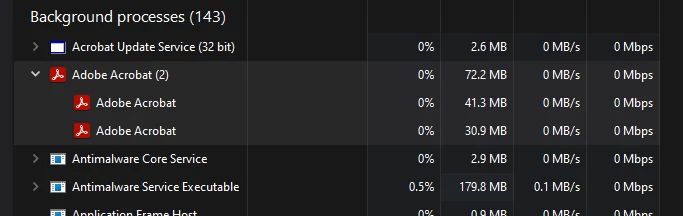
Checking Task Manager, looks like the Acrobat process is stuck and not closing out after clicking Cancel.

I would have to manually end the process to fix this issue to be able to open another PDF file.


The issue doesn't happen if I enter in the wrong password first to get an incorrect password notification window, and then click Cancel afterwards when it prompts for the password again, or if I enter in the correct password at first and then close out of it.


I tried a couple different existing password protected files and creating a new password protected pdf file, but they're all causing the same issue.

Meenakshi_Negi
Meenakshi_NegiCorrect answer
Legend
Oct 23, 2025 6:24 PM UTC

hey, download update, they fixed it.


Hi All,


Thank you for your patience.


The latest update released recently addresses this issue. Please try updating the application to the latest version. In Acrobat, go to Menu > Help > Check for updates. 

For more information, refer to the following help page: https://adobe.ly/4ortSnq. 


Let us know how it goes.


Thanks,

Meenakshi

19 replies

Participant
Oct 17, 2025 2:44 AM UTC

We are currently facing the same issue. We hope it can be resolved soon, as it’s causing unnecessary disruption to our work. Thank you.

Translate
AnandSri
Legend
Oct 17, 2025 2:14 PM UTC

Hello @Kossan25140539ltv1


I hope you are doing well, and I am sorry for the trouble.


The product team has identified the fix and is going through internal testing, and validation process, and once it is complete and is available with the public update, I will share an update here.


Thank you for your understanding and cooperation on this.


Regards,

Anand Sri.

Translate
Participant
Oct 23, 2025 9:50 AM UTC

Anyupdate on this issue? lot of users we're affected

Translate
Participant
Oct 16, 2025 11:49 PM UTC

Reporting that this issue also occurs when closing the search dialog box when opening a .pdx file. Steps to reproduce:

1) Open .PDX file.

2) Close search dialog box that appears. All Adobe windows now disappear, however Adobe Acrobat continues running in Task Manager.

3) Attempt to open PDF files. Nothing happens.

4) Close Adobe Acrobat from the Task Manager.

5) PDF files now open successfully.

Translate
Participant
Oct 11, 2025 9:16 AM UTC

Entering the wrong password  to get an incorrect password notification window, then clicking cancel has been a game changer for me having spent much of yesterday afternoon repairing and then reinstalling Reader. 
Thank-you

Translate
AnandSri
Legend
Oct 13, 2025 4:15 PM UTC

Hello @jane_4547


I hope you are doing well, and I am sorry for the trouble you had.


The product team is working on the fix, and it will be available soon. I will share an update here once the fix is available.


Thank you for your cooperation.


Regards,

Anand Sri.

Translate
Participant
Oct 9, 2025 7:55 AM UTC

We are having the same problm.

Translate
AnandSri
Legend
Oct 10, 2025 4:36 PM UTC

Hello All,


I hope you are doing well, and we are sorry for the trouble you had.


We have reported this issue to the product team, and they are working on identifying the root cause and developing a fix. We'll share an update here once the fix is available in the public update.

Thank you for your time and cooperation on this.


Regards,

Anand Sri | Acrobat Community Team

Translate
brandonh11760219
Participant
Oct 9, 2025 7:29 AM UTC

We are having the same issue, mulitple clients and users from different enviroments. What is the solution? 

Translate
Participant
Oct 8, 2025 8:34 AM UTC

Same issue here, client updated on 02/10/2025 multiple users reporting same issue

Translate
Participant
Oct 7, 2025 2:56 AM UTC

I'm having the exact same problem, and I just worked with an IT support client having the exact same problem. Both of us are opening local password-protected PDF files, and haven't been able to fix the issue by rebooting or cleaning/reinstalling Acrobat. The client is using a paid copy of Acrobat, while I'm using the free Acrobat Reader. Both of us are able to open the PDFs with Edge and Chrome without problems, including if we cancel the password dialog the first time and open the file again.

Translate
Meenakshi_Negi
Legend
Oct 2, 2025 7:17 PM UTC

Hi Colorful_help7199,


Thank you for reaching out and reporting this. 


As the process is stuck, please try repairing the application installation. In Acrobat, go to Menu > Help > Repair Installation.

If that does not work, please try reinstalling the application using the steps suggested below:

-Remove the application and run the cleaner tool (https://adobe.ly/3ISogDF).
-Reboot the machine
-Install Adobe Acrobat from the following page: https://adobe.ly/4nG2PFi.


If you still experience the same behaviour, please collect the logs using the diagnostic tool and share the log ID. We will get them checked.


Thanks,

Meenakshi

Translate
Participant
Oct 2, 2025 8:34 PM UTC

I tried repairing and reinstalling but neither worked.

Diagnostic Tool Log ID = 23d9bdf6-f5b8-4a75-85e9-6cc20d27135c

Translate
Legend
Oct 3, 2025 11:24 AM UTC

Thanks for the update and logs, @Colorful_help7199.

Are the files you are trying to open located locally on the machine or on a Cloud or Network drive? And what happens if you open those files on a browser like Edge or Google Chrome?


Best regards,
Tariq | Adobe Community Team

Translate