pageinmotion
Participant
December 13, 2024
Question

Adobe Acrobat Weblink Problem

  • December 13, 2024
  • 9 replies
  • 843 views

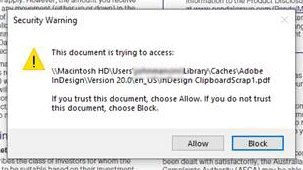
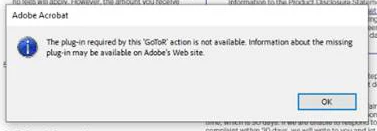
I’m having trouble with a weblink in a PDF file I sent to my client. When he clicks on the link, he’s prompted to “Allow” access, which is okay. But then, after clicking “Allow,” he gets another error message about plugins, as shown in the attached screenshot. Does anyone know why this is second message is happening?

Thank you

John
This topic has been closed for replies.

9 replies

Bernd Alheit
Community Expert
Community Expert
December 13, 2024

This doesn't look like a weblink.

Souvik Sadhu
Legend
December 14, 2024

I agree with Bernd here.


@pageinmotion The location shows local path of a Mac machine instead of a public URL.


-Souvik

Souvik Sadhu
Legend
December 13, 2024

Hi @pageinmotion,


Hope you are doing well. Sorry for the trouble.


you might want to try unblocking the links. You can do that by going to:

Start-> Registry Editor-> go to location:

HKLM\Software\WOW6432Node\Policies\Adobe\<Product Name>\<version>\FeatureLockDown\

Add Dword bDisablePDFRedirectionActions

Value 0


Also, from the path in the screenshot, it looks like the file is stored in the local storage of a Mac System, and it's highly unlikely that you will be able to access the file.


Hope this helps.


-Souvik

pageinmotion
Participant
December 13, 2024

Thanks Souvik. Unfortunately this pdf will be on a public website and other computers will encounter the same issue. It's just this one weblink that's a problem – a .org site... all other .com links are fine. Quite perplexing.