
C Mike Page
Participant
January 30, 2024
Question

Adobe Certificate conflict with SSI Single Sign on VA

  • January 30, 2024
  • 1 reply
  • 344 views

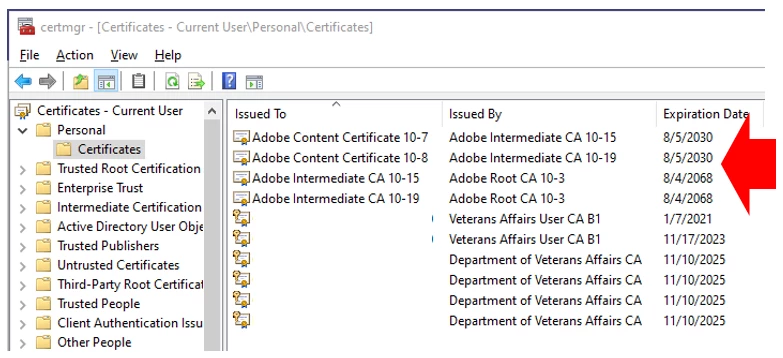
The Adobe certificates are loaded into the Personal/Certificates folder.  The SSOi certifcates for PIV log in to the Patient Record System and related products,  The Adobe certifcate shows as default forcing the user to have to search for their certificate each time they try to log it.  Can Adobe certificates be removed from the Personal/Certificates folder and be placed somewhere else?  Due to the expiration date being so far out, there is no way that the Badge expiration will be further out.  It appears to default based upon the Certificate with the date further into the future. 
This topic has been closed for replies.

1 reply

Participant
March 13, 2024

Did you ever get a answer to the issue with the adobe certs showing up on Single sign in?  you can find me on the teams chat on the Va network as well 


C Mike Page
Participant
March 14, 2024

The answer that I discovered is that Adobe if you have Adobe PRO on your computer the certificates will be placed into the personal certificate folder and the expiration is what is used to determine priority in the SSOi.  If you delete those your Authentication certificate will now appear first however the moment you open ADOBE PRO it will put them right back.  Adobe has no resolution advice.