
MarkyMarkGC
Participating Frequently
March 16, 2026
Question

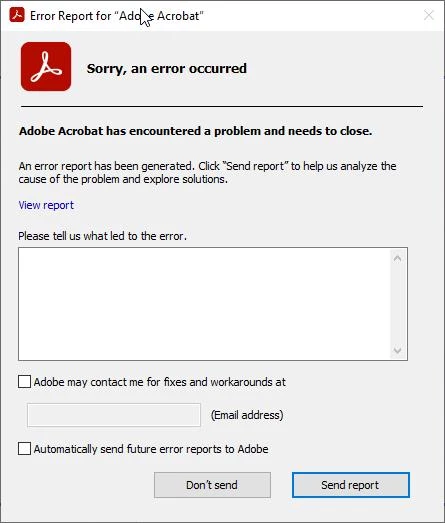
Adobe crashing after launching

  • March 16, 2026
  • 10 replies
  • 2072 views


We have 50+ users today that are having Adobe crash a few seconds after launching it.


error report detail - <crash exception="EXCEPTION_ACCESS_VIOLATION" exceptionCode="0xc0000005" instruction="0x00007FFEFD2FA295">


It was working fine last week

Adobe reader works fine for the same user on their same machine.

Adobe version: 23.006.20320


We have found that uninstalling and reinstalling seems to fix it but would like to know the root cause and other ways to remediate this or if other businesses / users have been impacted. 


    10 replies

    Community Manager
    March 30, 2026

    Hi ​@MarkyMarkGC , 


    We have a latest release available, https://www.adobe.com/devnet-docs/acrobatetk/tools/ReleaseNotesDC/index.html. I would recommend trying the latest update. 

    If the issue persists, please help us by providing crash logs. For crash or freezing issue, we would require crash logs: https://helpx.adobe.com/acrobat/kb/collect-logs-crash-freeze.html

    • Upload logs to any Cloud Drive(One Drive, Google Drive, Dropbox, etc)


    Let us know how it works.


    ~Tariq

    lara37464299uka4
    Participant
    March 18, 2026

    Is there an update or a fix on this please?

    MarkyMarkGC
    Participating Frequently
    March 18, 2026

    A temporary workaround is deleting the NglFeatureConfig file located in the users AppData directory.


    The perm fix is to apply an adobe update. We are deploying an update to all impacted users - Adobe_AcrobatDCProx64_Update_25.001.21288_R01


    User1011
    Participant
    March 18, 2026

    Are there any solutions for the problem?

    viji_27
    Participant
    March 18, 2026

    Previous user posted this workaround which worked for us:

    - When the sandbox is enabled: %temp%/acrobat_sbx/NGL/NglFeatureConfig
    - When the sandbox is disabled: %temp%/NGL/NglFeatureConfig


    Updating Adobe to later release also worked(we’re on continuous release v25.001.21288)

    March 16, 2026

    Are you able to check and see if the impacted machines received the latest Zoom Workplace update?

    MarkyMarkGC
    Participating Frequently
    March 16, 2026

    We don’t have zoom as part of our SOE ( We use Teams). 

    March 17, 2026

    Thank you. We don’t either, however users have it installed to join external meetings. The only common thing we found on all impacted endpoints (every single one!) was a Zoom Workplace update: version: 6.7.8 (32670) which was released mid last week.

    viji_27
    Participant
    March 16, 2026

    We’re having the same issue. Is there a link to the incident so we can follow up on updates?

    MarkyMarkGC
    Participating Frequently
    March 16, 2026

    We did log a case to Adobe via the portal. They did mention other businesses are impacted as well. Not sure on their main/parent incident number. 

    User-mR
    Participant
    March 16, 2026

    A workaround that worked for us.

    Delete the following file/paths:

    - When the sandbox is enabled: %temp%/acrobat_sbx/NGL/NglFeatureConfig
    - When the sandbox is disabled: %temp%/NGL/NglFeatureConfig

    Benderhaus
    Participant
    March 16, 2026

    So far this workaround is holding for us.

    Participant
    March 16, 2026

    We have the same problem since this morning on some of our machines.

    Reinstall doesn’t fix the issue. After that it just crashes without showing the error report dump.

    We can’t pinpoint what has changed that this comes up. We got clients with and without the lastest Windows Updates so that doesn’t seem to be a factor. 

    Does someone have further info on this issue?

    Cheers. 

    Participant
    March 16, 2026

    Since i can’t edit my original post….:

    After excluding the profile and plugins and the last MS Update KB as a reason and unsuccessfully uninstalling/reinstalling it we fixed the problem by running the Remote Update Manager (RUM).

    awilhelm
    Participant
    March 16, 2026

    Same…The only topic related action that happend before was an update of the Adobe Reader. Same on your side?

    MarkyMarkGC
    Participating Frequently
    March 16, 2026

    Yes, seems to be an adobe auto update that came through that caused this. 

    EugeneKoch
    Participant
    March 16, 2026

    Same issue. Hundreds company users affected. Technical incident to Adobe created with High prio

    MarkyMarkGC
    Participating Frequently
    March 16, 2026

    Just to add/update to the issue

    The Adobe version that doesn’t work is 25.001.20623

    If we roll back to 23.006.20320 it seems to work.