Participant
November 11, 2023
Answered

Adobe_Customized_Toolbar_Problems/suggestions

  • November 11, 2023
  • 1 reply
  • 329 views

Hello,

I have MS windows 10 with Adobe Acrobat DC. The New updated Customized ToolBar is Terrible!

(The last version was Perfect).

Problems:

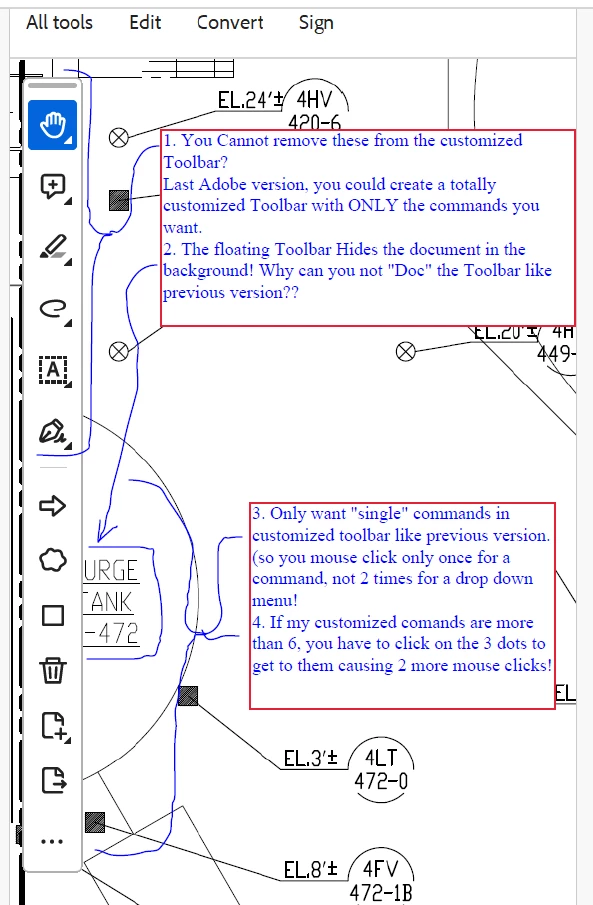
1. You Cannot remove the 1st 6 with flyout/dropdown menus from the customized Toolbar?
Last Adobe version, you could create a totally customized Toolbar with ONLY the commands you want.
2. The floating Toolbar Hides the document in the background! Why can you not "Doc" the Toolbar like previous version??

3. Only want "single" commands in customized toolbar like previous version. (so you mouse click only once for a command, not 2 times for a flyout/ drop down menu!
4. If my customized comands are more than 6, you have to click on the "3 dots" to get to them causing 2 more mouse clicks!


This topic has been closed for replies.
Correct answer try67

To go back to the old UI click the Options button at the top left corner (Windows) or open the View menu (Mac) and select Disable New Acrobat.
And you can vote here to get rid of it: https://acrobat.uservoice.com/forums/590923-acrobat-for-windows-and-mac/suggestions/47082691-ditch-the-2023-user-interface-in-acrobat

1 reply

try67
Community Expert
try67Community ExpertCorrect answer
Community Expert
November 12, 2023

To go back to the old UI click the Options button at the top left corner (Windows) or open the View menu (Mac) and select Disable New Acrobat.
And you can vote here to get rid of it: https://acrobat.uservoice.com/forums/590923-acrobat-for-windows-and-mac/suggestions/47082691-ditch-the-2023-user-interface-in-acrobat