dannyh60933802
Participant
July 21, 2017
Question

Adobe DC trial screen prevents me from opening installed Adobe XI Pro.

  • July 21, 2017
  • 2 replies
  • 810 views

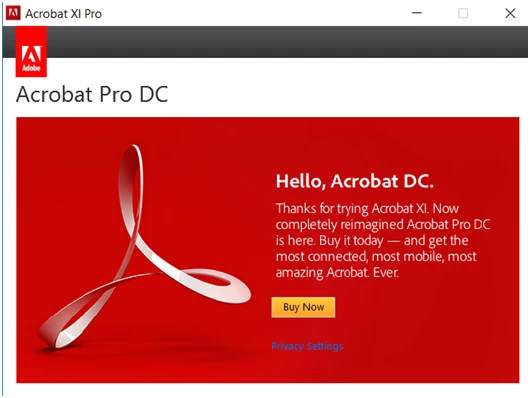
I have  just replaced my hard drive after a boot issue and had to reinstall windows (windows 10).  After reinstalling Adobe Acrobat XI Pro from my CD, when I open the program I get a red window  that prevents me from using my program. The following message is on the window (I have also pasted the image below)

“Hello, Acrobat DC.

Thanks for trying Acrobat XI. Now completely re imagined Acrobat Pro DC is here. Buy it today ---and get the most connect, most mobile, most amazing acrobat. Ever.  Buy Now

Please note:

I have not downloaded Acrobat DC - trial or anything else. I had no acrobat products installed after the windows re-install

When I loaded Acrobat XI from the CD, I successfully entered the my serial number, as requested.

Prior to the reinstall of windows, my Adobe XI was working fine.

Thank you for any help you can offer

Here is an image of the popup
This topic has been closed for replies.

2 replies

dannyh60933802
Participant
July 25, 2017

Thank you for your response. I followed the procedure above and reinstalled Adobe XI. Unfortunately I get the same results. The above red Acrobat DC screen pops up again. As far as I can tell, there was no adobe component on this computer prior to the re-installation. I had removed all adobe products and run the cleaner tools - both versions

kglad
Community Expert
Community Expert
July 25, 2017

using a browser that allows popups and cookies, contact adobe support during pst business hours by clicking here and, when available, click 'still need help', https://helpx.adobe.com/contact.html

kglad
Community Expert
Community Expert
July 21, 2017

uninstall all acrobat and reader versions

clean per Download Adobe Reader and Acrobat Cleaner Tool - Adobe Labs

restart your computer

reinstall acrobat xi