


Participating Frequently
April 17, 2023
Answered

Adobe eSign Stuck At 72%

  • April 17, 2023
  • 1 reply
  • 5394 views

This has been a problem for months and months and Adobe refused to fix the problem. When attempting to have a PDF document sent for signature, the application hands at upload at 72% and won't budge. The solutions offered by Adobe personnel don't work. Using the online version doesn't work. Signing out and back in doesn't work. Switching networks doesn't work. Unisntalling and reinstalling the application doesn't work. Using different PDF's doesn't work. Doing all the above and rebooting in between each doesn't work. 


This CLEARLY is an on ongoing problem and the workarounds provided don't work.  ADOBE - WHAT IS THE PROBLEM?! ENOUGH WITH THE NONSENSE, WHY ISN'T THIS BEING FIXED?! As I'm typing this the online version is stuck on "Loading..."


I use eSign for my business and this is a MAJOR problem? If I'm forced to signed up for Docusign, I'll just cancel my entire Adobe Suite and find alternatives. This is a feature I pay monthly for and if I can't use it, and Adobe refuses to acknowledge and fix the problem, I'll take my business and my money elsewhere. ENOUGH IS ENOUGH ADOBE!
Correct answer 22tommy2shoes22

Hi 22tommy2shoes22,


Thank you for reaching out, and sorry about the trouble caused.


Please let us know what happens when you try to use the service via the web. If you have not already tried, please sign in to your Acrobat web account and see if you can send a document without any issues.


On the desktop application, ensure that you are using the latest version. You may refer to the information on the latest updates in the following help document: https://adobe.ly/3TBSVqG

If the issue still occurs, share the current Acrobat and OS versions. Also, collect the logs using the steps suggested here: https://adobe.ly/4kzrrgy and share the log ID with us.


Feel free to let us know if you need any help.


Thanks,

Meenakshi


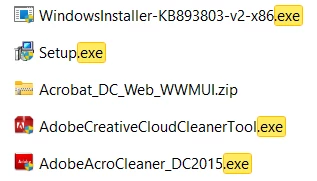
Hello Meenakshi. In the past month since I posted this, I spent a lot of time with in adobe help chat. Eventually a help chat representative had me download and run multiple cleaner .exe tools to completely wipe all traces of adobe products from my machine. They then had me install from a .zip and run a separate setup .exe script.

For me, this issue was not just a 'make sure you are up to date' issue. For anybody still stuck, try the help chat and reference these file names of the .exes they had me run. 


1 reply

Meenakshi Negi
Community Manager
Community Manager
April 18, 2023

Hi AnthonyToglife,


Thank you for reaching out, and sorry about the trouble caused.


We will be investigating this issue and will require more information:

- Please confirm if the issue occurs only in the desktop applications or AcrobatOnline account.

- Did you check if it happens with all files or a particular file? Try creating a new test PDF and check

- Would you mind sharing the screen recording of the workflow so we can share it with the team?

- Share the Acrobat and OS version numbers.

Share the process logs for the desktop application using the steps suggested on the following help page: https://www.adobe.com/devnet-docs/acrobatetk/tools/Labs/acromonitor.html

Your information will help us in the investigation of the root cause.


Thanks,

Meenakshi


Participating Frequently
April 19, 2023

Thank you for replying.

1) The issue occurs on both the desktop version and online. On the desktop version, the upload gets stuck at 72%. On the online version, it either says "Uploading" indefinitely or it errors and says the service is not available.

2) I tried it with multiple existing files, and created new files to test. Same results for all files.

3) There isn't a workflow that needs to be shared, to be honest, as it's a simple process. When you have the PDF open, you select the "Request E-Signatures" option; there isn't a workflow that can be done outside of what is built into the application. Your team should very much know and understand how the application works.

4) 

Architecture: arm64

Processor: Apple M1 Max

Build: 22.1.20085.0

AGM: 4.30.116


macOS Monetary

12.6.4


It should be noted, it is working today, however given that this issue dates back to at least 2019 based on the threads in this community, I don't have high hopes that the problem won't return. It's disappointing that Adobe refuses to fix issues like this, and instead force people to either look elsewhere for the service or wait until it starts working again.

Participant
April 11, 2024

It's April 2024 and still an issue.