
Participant
July 5, 2025
Question

adobe form Calculations and totals

  • July 5, 2025
  • 1 reply
  • 423 views

Hi all, 

I need some help please, i have the below form that i want to setup to enable my remote team to fill in the form. 


1 .Is there anyway that i can set it up that if they select time the drop down in point 3, it will then auto fill in the corrosponding colums? 


2. is there anyway that i can then have the totals at the bottom for each column? 
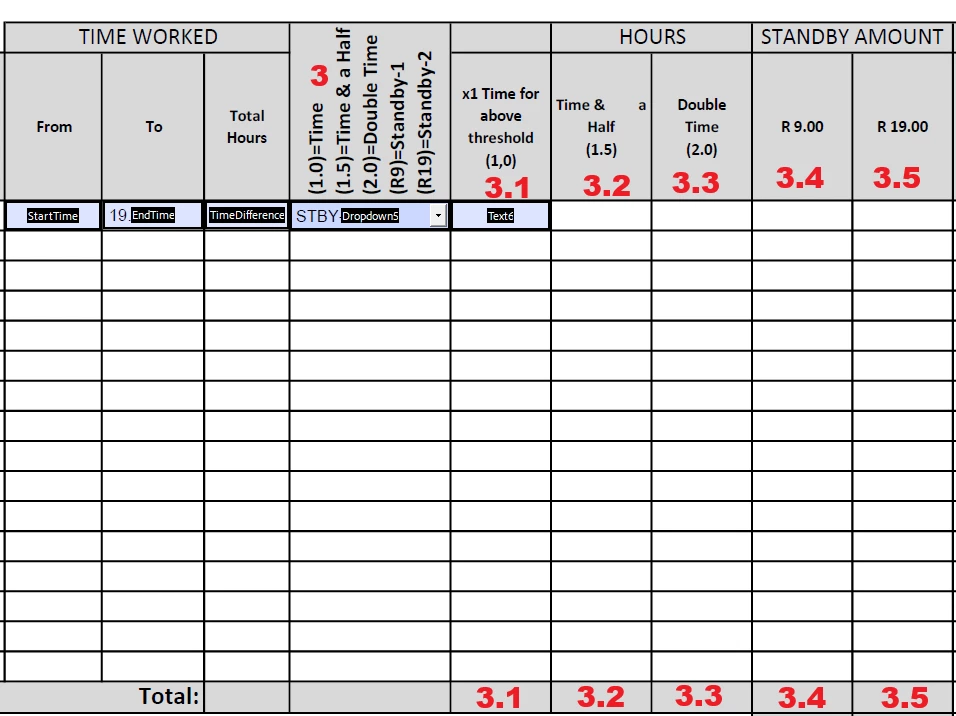
 

each Text field is formated to numbers. 

Script for above Total hours


// Get the start and end times from the form fields
var startTime = this.getField("StartTime").value;
var endTime = this.getField("EndTime").value;

// Function to convert time string to decimal hours
function timeStringToDecimal(timeString) {
if (!timeString) return 0; // Handle empty fields
var parts = timeString.split(":");
var hours = parseInt(parts[0], 10);
var minutes = parseInt(parts[1], 10);
return hours + (minutes / 60);
}

// Calculate the time difference in decimal hours
var startDecimal = timeStringToDecimal(startTime);
var endDecimal = timeStringToDecimal(endTime);
var decimalDifference = endDecimal - startDecimal;

// Ensure the result is positive
decimalDifference = Math.abs(decimalDifference);

// Format the output
event.value = decimalDifference.toFixed(2); // Display with 2 decimal places

1 reply

Community Manager
July 7, 2025

Hi @johnathan_1494,


Thanks again for reaching out!


Yes, it’s definitely possible to build a form with calculated totals using Acrobat or Acrobat Reader on a desktop, and you’re on the right track with your Qty * Unit structure.


Below is an enhanced example using JavaScript to calculate:

  • Subtotals for each line item (Qty × Unit)

  • A Grand Total by summing all line totals


Sample Field Setup:

Let’s say your fields are named like this:

  • Qty1, Unit1 → result goes in LineTotal1

  • Qty2, Unit2 → result goes in LineTotal2

  • …and so on

  • The grand total goes in a field called GrandTotal


JavaScript for Each Line Total (e.g., in LineTotal1 → Custom Calculation Script 😞

var qty = this.getField("Qty1").value;

var unit = this.getField("Unit1").value;

if (!isNaN(qty) && !isNaN(unit)) {

    event.value = qty * unit;

} else {

    event.value = 0;

}


Copy and adjust this for LineTotal2, LineTotal3, etc., changing the field names accordingly.


JavaScript for Grand Total (in GrandTotal → Custom Calculation Script 😞

var total = 0;

for (var i = 1; i <= 5; i++) { // Adjust 5 to however many line items you have

    var line = this.getField("LineTotal" + i);

    if (line && !isNaN(line.value)) {

        total += Number(line.value);

    }

}

event.value = total;


This script will sum all the LineTotal fields and display the result in the GrandTotal.


⚠️ Important Notes:

  • JavaScript runs only in Acrobat or Reader on desktop — it won’t work in most browsers or preview apps.

  • Ensure users download and open the form with Acrobat or Reader.

  • Saving the form locally is required for full functionality.

  • Mobile apps have limited support for JavaScript.

  • For broader access or signature workflows, consider using Acrobat Sign Web Forms.


Wait for more inputs from experts.


Best regards,
Tariq | Adobe Community Team

Participant
July 9, 2025

Hi Tariq, 

Thank you i am still new at all this, would you mind if i send you the adobe form and you do the first one. So that i can see what the scripts must be? I would then be able to do the rest.... 


this is daunting....