
Adobe Form Javascript help - Service Agreements
Hey All!
I'm having some trouble getting form fields to work with javascript between 3 PDF forms that our business uses.
To give some context, we have a service request form that is used to collect the data. All the form names and replicated throughout the forms, however, some of the fields need to be merged. for example, on the service request, the client's address is requested across 5 fields. "Address_2" isn't always filled.
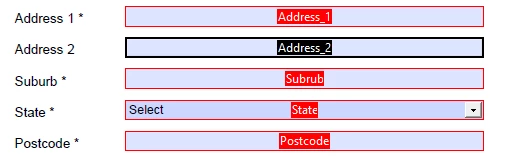
The data from the Service Request form is then exported to a data file which we use to import onto our Service Agreements and Renewals.
The form field on our Service Agreements and renewals is a singular field, as below.

I need to somehow merge the data gathered from the service request form as a string in to the above form field.
This is also the case for our client's name!
"First_Name" and "Last_Name" are requested as seperate fields on the service request form

I need to then merge these two fields into the one below

labelled "Name_Of_Participant"
I have tried the following scripts with no success;
//this was tried as a custom validation scipt on the "Name_Of_Participant" field
{
var aElements = new Array();
var aFields = new Array("First_Name", "Last_Name");
for(var i = 0; i < aFields.length; i++)
{
aElements.push(this.getField(aFields).value);
}
function NotSelectOne(value)
{
return value != "Select one";
}
var aCombined = aElements.filter(NotSelectOne)
event.value = aCombined.join("");
}
and
//this was tried also as a custom validation script, on the "Address" field
event.value = getField("Address_1").valueAsString + ", " + getField("Address_2").valueAsString + ", " + getField("Suburb").valueAsString + ", " + getField("State").valueAsString + ", " + getField("Postcode").valueAsString;
I will reiterate that these are across 3 seperate PDF forms, so I am unsure whether this is doable or not, however any assitsance would be greatly appreciated.
I have attached our service request and renewal blank files for further assistance 🙂


 AdChoices