
Adobe PDF: Portfolio Conversion - Folder Name Information Removal
Is there a way to remove the folder name information in a previously created Portfolio?
I have been appending needed emails from Outlook into portfolios, but after updated to Adobe Pro, rather than just showing all the PDF's I'm being forced to click through all the folder locations, and for some reason I can't find a navigation pane to just skip to the end.
Email@email.com > Inbox (1) > Folder 1 > Folder 2 > finally all the PDFS. There is no apparent way to go back to any of the previous folders once i've opened them either.
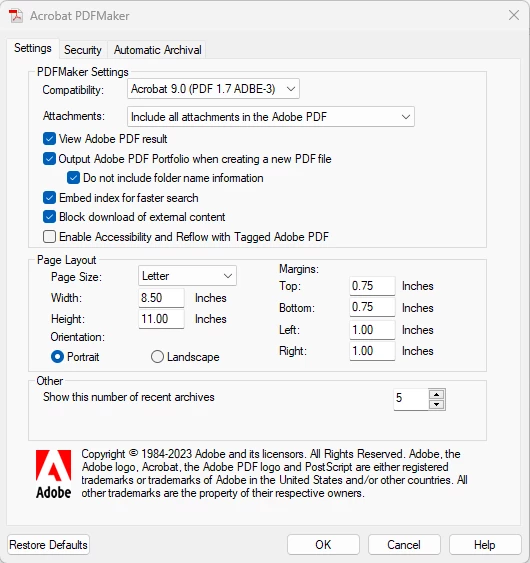
I've found in the Acrobat tab added to the Ribbon the "Change Conversion Setttings" where under Settings I can check the option to "Do not include folder name information" which solves the problem for any new Portfolio's I'm making, but all the old ones I have are including the folder names when they previously did not.
 AdChoices