GCarrobis
Participant
May 29, 2026
Answered

Adobe PDF Printing Preferences reset after Acrobat update or sometimes even when Acrobat is opened

  • May 29, 2026
  • 3 replies
  • 5 views

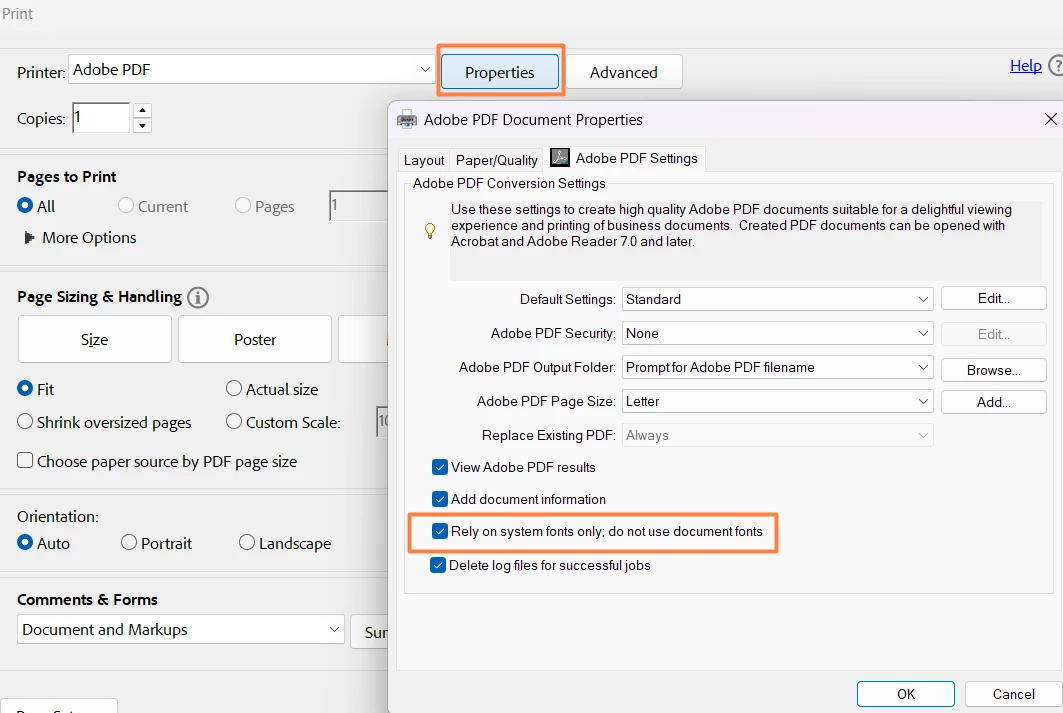
I am trying to use the Adobe PDF printer with Driver Adobe PDF Converter in a production environment. I have set up an Adobe Output Folder, unchecked “View PDF results”, unchecked “Rely on system fonts”, and set up a custom Paper Size. This is so the PDF generation can happen in the background without input from an operator, but I keep experiencing interruptions where those settings are reset. Sometimes this seems to happen without input, which other questions and reports indicate could be Adobe updates. But other times, just opening up Adobe Acrobat seems to be enough to wipe out my settings for the Adobe PDF printer.

Am I doing something incorrectly to lead to the loss of Printing Preferences when Acrobat is opened or Adobe is updated? Is there a type of Adobe license that would work better for my use case? I am mainly interested in using the Adobe PDF printer as I have set it up (directly to an output folder without input, without viewing PDF results) as it is not vital that the operators are able to open up the pdf themselves at their stations

I voted on the following issue on User Voice, but I see that it is from 2021 and other people are still commenting this very month: Printing preferences reset to Letter after Acrobat updates – Share your feedback on Acrobat DC

    Correct answer Anand Sri Bhattacharya

     Hello ​@GCarrobis 


    I hope you are doing well, and thanks for reaching out. We’re sorry for the trouble you had.


    Please note that these are expected behaviours.

    On launch: Acrobat doesn't store its print-dialogue defaults. Each time it starts, it reads whatever defaults exist on the Windows printer object and uses those. So changes you make inside Acrobat's session don't "stick" the way you'd expect.

    On update: The Adobe PDF printer (driver "Adobe PDF Converter") is recreated during updates, and its configuration isn't preserved, so your output folder, View results, font, and custom paper size all revert together because they all live on that printer object.


    Suggestions:

    In Windows:

    1. Go to Control Panel > Devices and Printers
    2. Right-click Adobe PDF > select Printing Preferences
    3. Reconfigure:
      • Output folder
      • Uncheck View Adobe PDF results
      • Paper size (custom)
    4. Click Apply

    For device-level settings:

    • Right-click Adobe PDF > Printer Properties > Preferences


    Verify font handling (important for automation)

    In Acrobat:

    1. Open any PDF
    2. Go to Menu > Print
    3. Select Adobe PDF
    4. Click Properties
    5. Ensure:
      • “Rely on system fonts only; do not use document fonts” is unchecked


    Please note that no Acrobat license tier locks Adobe PDF printer preferences and unattended print behaviour.


    For more details, you can refer to these Adobe articles:

    Acrobat Distiller fonts overview

    Embedding fonts in PDFs overview

    Acrobat PDF conversion fails due to virtual fonts on Windows


    I hope this helps, and let us know if you need any assistance.

    Regards,

    Anand Sri.

    3 replies

    Amal Jaiswal
    Community Manager
    Community Manager
    May 29, 2026

    Hi there, 

    Hope you are doing well and thanks for reaching out. Please share your feedback/feature request directly with the product development team here https://acrobat.uservoice.com/forums/590923-acrobat-for-windows-and-mac 


    ~Amal

    Anand Sri Bhattacharya
    Community Manager
    Community Manager
    May 29, 2026

     Hello ​@GCarrobis 


    I hope you are doing well, and thanks for reaching out. We’re sorry for the trouble you had.


    Please note that these are expected behaviours.

    On launch: Acrobat doesn't store its print-dialogue defaults. Each time it starts, it reads whatever defaults exist on the Windows printer object and uses those. So changes you make inside Acrobat's session don't "stick" the way you'd expect.

    On update: The Adobe PDF printer (driver "Adobe PDF Converter") is recreated during updates, and its configuration isn't preserved, so your output folder, View results, font, and custom paper size all revert together because they all live on that printer object.


    Suggestions:

    In Windows:

    1. Go to Control Panel > Devices and Printers
    2. Right-click Adobe PDF > select Printing Preferences
    3. Reconfigure:
      • Output folder
      • Uncheck View Adobe PDF results
      • Paper size (custom)
    4. Click Apply

    For device-level settings:

    • Right-click Adobe PDF > Printer Properties > Preferences


    Verify font handling (important for automation)

    In Acrobat:

    1. Open any PDF
    2. Go to Menu > Print
    3. Select Adobe PDF
    4. Click Properties
    5. Ensure:
      • “Rely on system fonts only; do not use document fonts” is unchecked


    Please note that no Acrobat license tier locks Adobe PDF printer preferences and unattended print behaviour.


    For more details, you can refer to these Adobe articles:

    Acrobat Distiller fonts overview

    Embedding fonts in PDFs overview

    Acrobat PDF conversion fails due to virtual fonts on Windows


    I hope this helps, and let us know if you need any assistance.

    Regards,

    Anand Sri.

    GCarrobis
    GCarrobisAuthor
    Participant
    May 29, 2026

    Thanks for your response, though it is disappointing to hear that the Adobe PDF printer is recreated with every update. Could the defaults be stored in a future release?

    I am making changes to the Preferences through Print Management in Windows, but I am not always the one resetting the defaults and preferences after a reset. So it is possible that someone else is not resetting things correctly, I’ll investigate that

    Anand Sri Bhattacharya
    Community Manager
    Community Manager
    May 29, 2026

    @GCarrobis You can use the Adobe Wish form to file a feature request with the product team.

    I will also share this with the team for consideration.


    Let us know the observations after trying the preferences settings.


    Regards,

    Anand Sri

    GCarrobis
    GCarrobisAuthor
    Participant
    May 29, 2026

    Unlike with some of the other people I see having this issue, I am in the United States and my custom Paper Size is not A4