
Adobe PDF T1 font printing bug
There is an issue printing web pages from Chrome and Edge using the Adobe PDF printer (which does not appear to have been updated since the Obama administration - it still looks exactly as it has for the past ten years, and still only has 1b as a PDF/A option): the resulting PDFs contain only the T1 font, are not searchable, and the text cannot be selected. (It selects in tall blue lines - see screenshot.) Copying and pasting the text yields only gibberish.
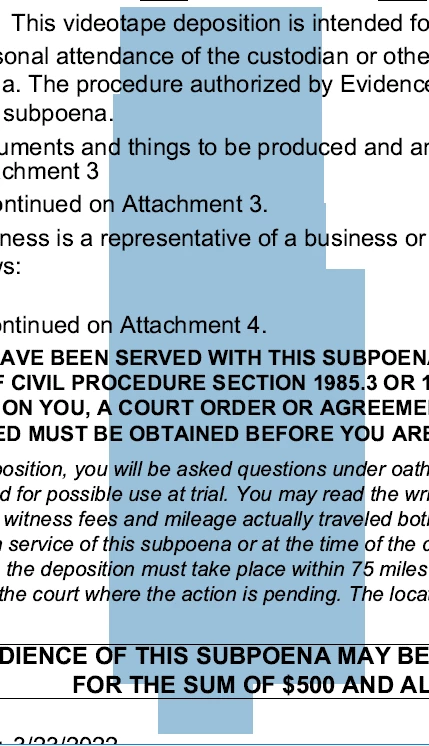
There is no fix for PDFs created this way; they cannot be re-OCRred (even after removing hidden text), nor can they be edited with the Edit tool.
Increasingly I have seen this in PDFs created by the courts, and the only way we can work with them is to print and re-scan them. But now my own Word Processing department has been creating them, unwittingly using the defective Adobe PDF printer.
I have scoured the Internet as well as searched this forum, and, astonishingly, can find absolutely no mention of this issue, which I have been running across with ever-increasing frequency in my position as a Word Processor.
Any feedback or further information or insight about this issue would be appreciated.


 AdChoices