


Adobe Pro 2025 - Word Save As PDF corrupting fonts
Does anyone know why this happens?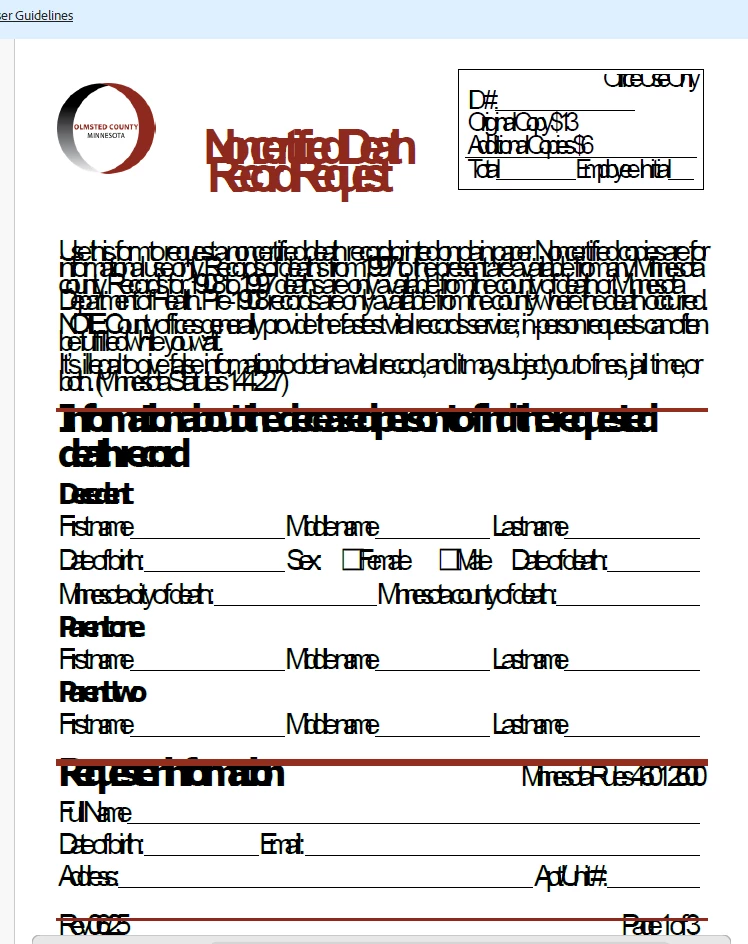
Windows 11 System
Adobe Pro 2025
From Microsoft Word - Save as PDF
Kept all of the defaults when we installed Adobe Pro 2025.
Our IT team tried the following:
Had a mixed 32/64-bit Office installation due to Microsoft Access Database Engine 2007 32-bit. Repaired Adobe, removed database engine, and reinstalled Office. Installed Dell Power Manager and set it to Ultra Performance mode to speed things up. Exacqvision was using more than 40% of CPU budget in the background; Microsoft Edge another 30%. Ended those processes. Enabled core isolation/memory protection, updated programs, disabled Edge adware, and transferred sticky notes. PC has pending operating system updates, the BIOS hasn't been updated since 2021, and system file checker (sfc) has a pending operation.
After Windows updates finished, he logged in and the Office+Adobe. repair did not resolve the issue. sfc /scannow found corruption and repaired it. Christopher has had many issues converting documents on this PC
Deleted Computer\HKEY_LOCAL_MACHINE\SOFTWARE\Adobe\Acrobat in Registry Editor. Reinstalling Adobe Acrobat. Updating programs, drivers, and firmwares in the meantime.
None of this corrected the problem. We have more than one computer doing this. What else should we explore?
 AdChoices