


Participant
Nov 5, 2026 5:57 AM UTC
Answered

Adobe Pro- Combine Files with Excel, error:missing PDF Maker Files

We have a client using Adobe Acrobat Pro Version 26.2.22031 who is experiencing issues when attempting to Combine Files containing both PDF and Excel documents.

When the user tries to combine files, Adobe displays the following error:

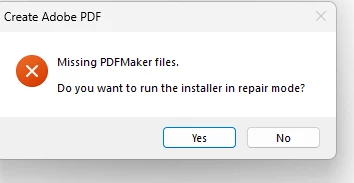
"Missing PDFMaker Files. Do you want to run the installer in Repair Mode?"

Notably, the user is able to convert Excel files to PDF directly from within Excel without any issues. The problem only occurs when using the Combine Files feature in Acrobat with Excel files.

Troubleshooting Performed

  • Performed a clean uninstall and reinstall of Adobe Acrobat Pro.
  • Verified that the PDFMaker Office Add-in is installed and configured to load at startup.
  • Confirmed the PDFMaker.OfficeAddin LoadBehavior registry value is set to 3.

Findings

Check Result
PDFMaker DLL Present
DLL Version 26.2.21901.0
COM Add-in Registration Present
LoadBehavior 3
Excel DisabledItems Not found
Acrobat Combine Files Fails/Crashes when processing Excel files

Additional Notes

  • The Adobe PDFMaker add-in is available and functioning within Excel.
  • Excel-to-PDF conversion works successfully when initiated directly from Excel.
  • The issue appears to be isolated to the Acrobat Combine Files process when Excel workbooks are included.

Could you please advise on any known issues, additional logging that can be enabled, or further troubleshooting steps to identify why Acrobat is unable to process Excel files during the Combine Files operation?
 

    happy_student1db6Correct answer
    Participant
    Nov 9, 2026 12:47 AM UTC

    Thank you, I have resolved the issue. I navigated to the Office application, opened the Security Alert add-in, and selected the option to enable all content published by this publisher. After enabling the publisher's code, the issue was resolved.


    3 replies

    Meenakshi Negi
    Community Manager
    Community Manager
    Nov 5, 2026 7:06 AM UTC

    Hi happy_student1db6,


    Thank you for reaching out and reporting this behaviour.

    As mentioned, the problem arises when an Excel file is included with other files during the file combination process. Could you please confirm whether the other files are PDFs or a different file format?

    For testing purposes, please try combining only the PDF files first, and then try combining PDFs with Word files. Let us know if you encounter any error messages. This will help us determine if the issue is specific to Excel files.


    Please try updating the application to the latest version. You may refer to the following page to learn more about the recent updates: Acrobat Release Notes. After the update, please check whether the same behaviour occurs.

    If the issue still occurs, try repairing the installation once. In Acrobat, go to Menu > Help > Repair Installation. Please try reinstalling again using the steps suggested below:

    • Uninstall the application and run the cleaner tool from the following link: Acrobat Cleaner tool.

    • Reboot the machine. 

    • Install Adobe Acrobat from the following page: Install Acrobat.  

    Let us know how it goes.


    Thanks,

    Meenakshi

    Translate
    happy_student1db6AuthorCorrect answer
    Participant
    Nov 9, 2026 12:47 AM UTC

    Thank you, I have resolved the issue. I navigated to the Office application, opened the Security Alert add-in, and selected the option to enable all content published by this publisher. After enabling the publisher's code, the issue was resolved.


    Translate
    Meenakshi Negi
    Community Manager
    Community Manager
    Nov 9, 2026 4:30 AM UTC

    Hi happy_student1db6,


    That's wonderful! I'm glad the issue is resolved, and I appreciate you sharing the steps that helped. This will assist others with the same issue.

    Please let us know if we can provide any further assistance.


    Thanks,

    Meenakshi

    Translate