
Participant
April 22, 2025
Question

Adobe pro with Windows 11 error

  • April 22, 2025
  • 1 reply
  • 135 views

We are in process of upgrade to windows 11. (office environment). Our existing users with windows 10 using adebe pro without problem. But when we replace their pc with windows 11, intermittenly will pop up error message as below: 
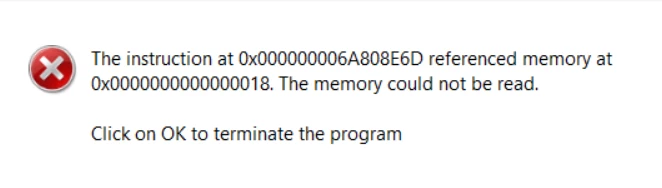
Does anyone face this issue too? any solution found?


Thanks

1 reply

Meenakshi Negi
Adobe Employee
Adobe Employee
April 22, 2025

Hi tan_6061,


Thank you for reaching out.


Please try the following suggestions and see if that makes any changes:


1. Go to Acrobat > Preferences > Security (Enhanced) > uncheck the checkbox "Run in AppContainer"-> Restart Acrobat.


2. If the above doesn't work, try running the app in Compatibility Mode. To do so, right-click the app icon > properties > compatibility > check the box saying "Run the app in Compatibility mode for"> select Windows 8 in the dropdown > Apply> OK.


If the issue still occurs, please share the Acrobat version installed. Please collect the diagnostic logs using the steps suggested in the following help document: https://adobe.ly/4jnEGRE. Share the Log ID with us.


Thanks,

Meenakshi