
Known Participant
January 12, 2023
Answered

Adobe Reader Extensions no longer working in Acrobat Pro

  • January 12, 2023
  • 2 replies
  • 2028 views

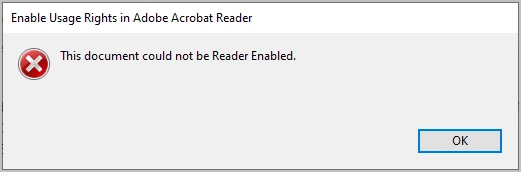
I use Adobe LiveCycle Designer ES4 to design forms.  I add reader extensions to the pdf using Adobe Acrobrat Pro:  File > Save as Other > Reader Extended PDF > Enable More Tools (includes form fill-in & save)…  I've been doing this for years and now all of a sudden it is no longer working.  I'm getting this message.  Any ideas why.  My IT can't figure it out.
This topic has been closed for replies.
Correct answer try67

Correct, they expired. See: https://helpx.adobe.com/acrobat/kb/reader-extended-pdfs-and-adobe-root-ca-expiry.html

You have to re-apply them using the latest version of Acrobat, although in most cases they are not really needed any longer (not sure if that also applies to LCD forms, though).

2 replies

try67
Community Expert
try67Community ExpertCorrect answer
Community Expert
January 13, 2023

Correct, they expired. See: https://helpx.adobe.com/acrobat/kb/reader-extended-pdfs-and-adobe-root-ca-expiry.html

You have to re-apply them using the latest version of Acrobat, although in most cases they are not really needed any longer (not sure if that also applies to LCD forms, though).

meem23Author
Known Participant
January 13, 2023

Thanks for the responses.  I will relay this information to appropriate parties. 

Bernd Alheit
Community Expert
Community Expert
January 12, 2023

What version of Adobe Acrobat does you use? 

meem23Author
Known Participant
January 12, 2023

Hi,  Acrobat Pro


Bernd Alheit
Community Expert
Community Expert
January 12, 2023

Install the updates.