
Participant
June 4, 2024
Answered

Adobe Reader installed. Sending PDF through Adobe to Outlook says I need to download Adobe Reader

  • June 4, 2024
  • 1 reply
  • 332 views

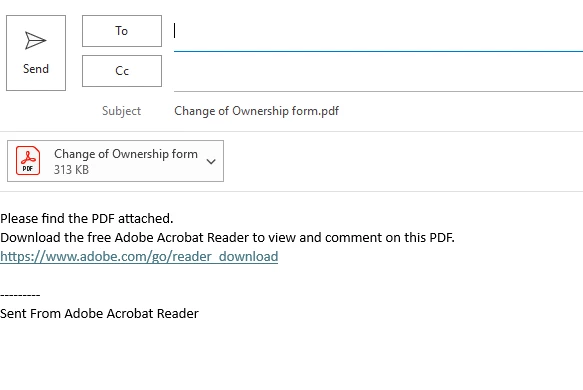
I have downloaded the lastest Adobe Reader and had a PDF open in it. I hit the mail icon in the upper right to email it through Outlook. In the email, it says download Adobe Reader. I obviously don't need reader, and I don't want that to go to my recipients. Does anyone know how to turn it off? Thank you for any assistance.
This topic has been closed for replies.
Correct answer Tariq Ahmad

Hi @Mackenzie3784180708hk,


This message can be edited per user requirement as it opens as a draft. 

This app-generated or default message is meant to help a recipient get a good experience with PDF using Reader if the intended recipient doesn't have Acrobat or Reader installed on the machine. As mentioned, you can edit the message as you require. 


Let us know if you have further questions. 


~Tariq


1 reply

Tariq AhmadCommunity ManagerCorrect answer
Community Manager
August 2, 2024

Hi @Mackenzie3784180708hk,


This message can be edited per user requirement as it opens as a draft. 

This app-generated or default message is meant to help a recipient get a good experience with PDF using Reader if the intended recipient doesn't have Acrobat or Reader installed on the machine. As mentioned, you can edit the message as you require. 


Let us know if you have further questions. 


~Tariq