
Participant
June 10, 2024
Answered

Adobe security settings ??

  • June 10, 2024
  • 1 reply
  • 679 views

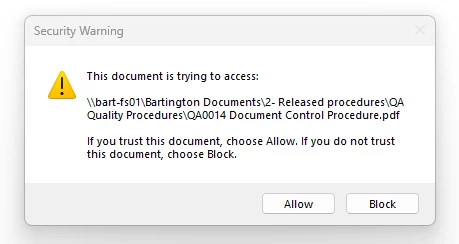
I generate links in a new adobe pdf document and the links work fine. I save the document and the links still work fine, the selected file opens immediately. I close the pdf document and re-open it and the links then keep asking me if I trust this document before it will open it. does any one know why and how to stop this ?? Is there a setting that kicks in when you open a pdf ?? 

I have the same issue if I convert a word document with hyperlinks.
 

This topic has been closed for replies.
Correct answer Tariq Ahmad

Hi @Steve37946205m8y6 

You can try to add the location to security settings as a privileged location. 

To do so, follow the following steps:

  • Mac: Launch Acrobat, Acrobat Menu> Preferences
  • Win: Launch Acrobat, Hamburger Menu(New UI) or Edit (Classic UI) > Preferences
  • Security(enhanced).
  • Privileged location > Add Folder Path.

Click Ok to save settings. Re-launch Acrobat and try again.


Let us know how It works.


~Tariq

1 reply

Tariq AhmadCommunity ManagerCorrect answer
Community Manager
August 1, 2024

Hi @Steve37946205m8y6 

You can try to add the location to security settings as a privileged location. 

To do so, follow the following steps:

  • Mac: Launch Acrobat, Acrobat Menu> Preferences
  • Win: Launch Acrobat, Hamburger Menu(New UI) or Edit (Classic UI) > Preferences
  • Security(enhanced).
  • Privileged location > Add Folder Path.

Click Ok to save settings. Re-launch Acrobat and try again.


Let us know how It works.


~Tariq