Participant
May 21, 2020
Answered

Adobe shrinks print out when printed double sided ???

  • May 21, 2020
  • 2 replies
  • 2581 views

I have the latest Adobe Acrobat Pro. I am having issues with Adobe shrinking my print out's. I do not want shrunken documents when printed. If i print normal i get full size. But, if i set it for double sided, it does not print as shown in the pre view, it is shrunk in from each side. Why is this happening and how do i fix it so i get full page double sided printouts????
This topic has been closed for replies.
Correct answer Document Geek

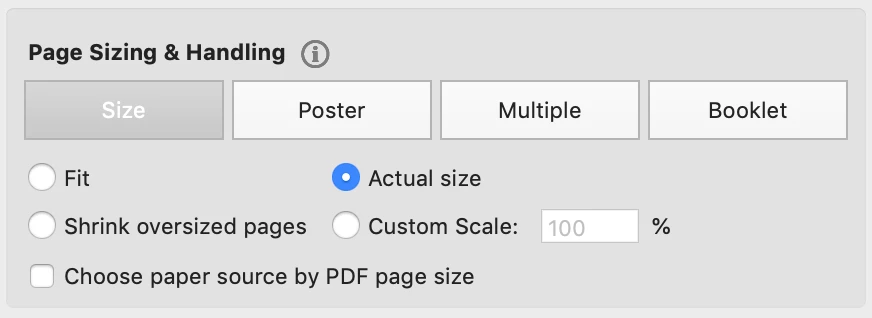
Do you have your page sizes set to "Fit" or "Shrink Oversized pages"? It should be set to "Actual Size."


2 replies

Amal.
Legend
June 2, 2020

Hi there


We are sorry for the trouble and the delay in response.


++ Adding to the discussion


Is this a behavior with a particular PDF file or with all the PDFs? Please try with a different PDF file and check.


Also, please try to update the application to the new version 20.009.20065 Go to Help > Check for Updates.


Let us know how it goes


Regards

Amal

michellekelln1963
Participant
January 24, 2024

I have never had this problem until today!

I have set print to actual size and it still shrinks the print out, I have tried other documents, it shrinks them all!

I have Adobe Acrobat Pro.

How can I fix this? So annoying!!

Thank you!


Amal.
Legend
January 25, 2024

Hi @michellekelln1963


Hope you are doing well.


Make sure you have the recent version 23.08.20470 installed. Go to Help > Check for updates and reboot the computer once. Check for any missing/pending updates for  printer driver/firmware and try updating them and check.
 
Also try to repair the installation from the help menu (Win Only) and see if that works.
 
Please try to reset the Acrobat preferences as described here https://adobe.ly/3Ucy9iK


Also go through the help page https://adobe.ly/42bcfhU


Regards

Amal

Document Geek
Community Expert
Document GeekCommunity ExpertCorrect answer
Community Expert
May 21, 2020

Do you have your page sizes set to "Fit" or "Shrink Oversized pages"? It should be set to "Actual Size."


Participant
May 23, 2020

When i set it for actual size, it show's the page being too big to print on letter size paper even though adobe say's that is the page size???