


Question
ADOBE STARRED FILES
I'm posting this to hopefully save someone else my frustration.
I have a business account and noticed that STARRED FILES was backing up to the cloud. For at least ONE file it was CHANGING the document so the OCR was damaged.
I deleted and restarred the file and it kept doing the same damage.
I quickly looked up how to stop cloud storage for starred files and came up with the reference link below. It was NOT helpful or relevant to my DC edition.
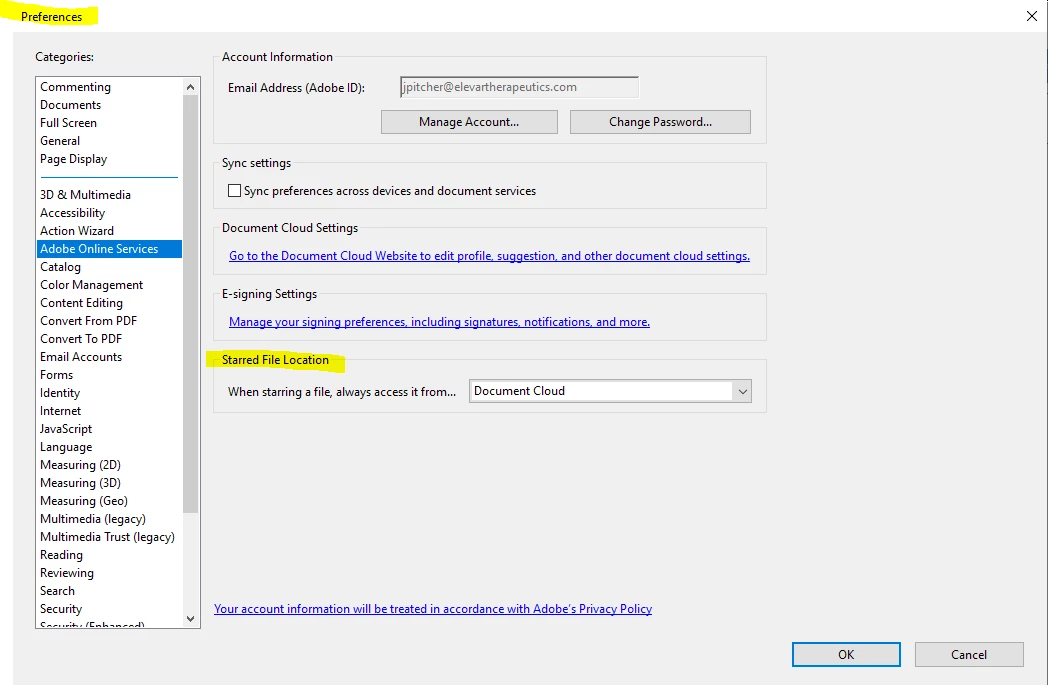
Finally, I saw in the PREFERENCES > ADOBE ONLINE SERVICES > STARRED FILE LOCATION
This worked pefectly and no further issues.
ADOBE, UPDATE YOUR HELP FILE
https://www.adobe.com/devnet-docs/acrobat/android/en/settings.html#starred-file-location
Thanks.
 AdChoices