
Participant
February 20, 2025
Question

Adobe Update service breaking C:\windows\system32\VCRUNTIME140.dll

  • February 20, 2025
  • 1 reply
  • 270 views

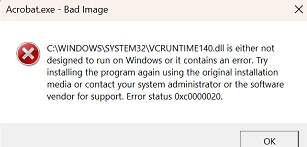
We have a PC (belonging to our CEO) that has the VCRUNTIME140.dll file replaced when the Adobe Update Service (installed with Adobe Reader) runs with a file having zero bytes. We repaired the file yesterday only to have the Adobe Update break the file again this morning. Any ideas to why/how this is happening. We get the following message:
 

1 reply

creative explorer
Community Expert
Community Expert
March 8, 2025

@TBTCarl  if the file has 0 bytes, the file is corrupted. Uninstall with Adobe Cleaner from Adobe's website not a third party cleaner, great at removing old Adobe software, corrupt installation files https://helpx.adobe.com/ca/creative-cloud/kb/cc-cleaner-tool-installation-problems.html

When done 100%, go back and log into Adobe and install the Reader. If you know what version work great before the update, maybe use that one instead https://get.adobe.com/reader/otherversions

m
Souvik Sadhu
Community Manager
Community Manager
April 25, 2025

Hi @TBTCarl,


Hope you are doing well. Sorry for the trouble with Acrobat.


In case you are still looking for a solution, I would like to add to what Creative Explorer said.

You can try repairing the C++ files. Steps can be found here: https://adobe.ly/44KEcjV.


Hope this helps.


Regards,
Souvik.