
Participating Frequently
February 10, 2026
Question

Adobe window keeps enlarging when opening PDF

  • February 10, 2026
  • 1 reply
  • 160 views

I’ve had an issue with Adobe Acrobat where I open a PDF and the application window doubles in size. I close the PDF, open another PDF and its even larger. Eventually after a couple opens, the acrobat application window is full screen, although not “Fullscreen” its fully maximized to where I need to grab the corner with my mouse and manually resize to a typical document window size. This is happening from a closed instance to opening a PDF. If I only close the document (tab) and leave acrobat running, its fine.

This is happening on my Windows 11 Business edition (Surface Pro 11). I have since recently restored/factory reset my Surface with a fresh reinstall of Windows 11 Pro/Business. Fresh installed Adobe Acrobat and the symptom is still happening. It was happening before and after a fresh windows install. I have the latest version at 64bit 25.001.21184.

I have AI searched for a solution and they didnt help resolve it. Anyone have any ideas or having the same problem?
    1 reply

    AnandSri
    Community Manager
    Community Manager
    February 11, 2026

    Hello ​@jasqid 


    I hope you are doing well, and thank you for reaching out. We’re sorry for the trouble you had.

    When Acrobat launches from a closed state, it reapplies Page Display + DPI scaling + document Initial View, causing the window to grow each time. Leaving Acrobat open avoids the reset, which matches your observation.


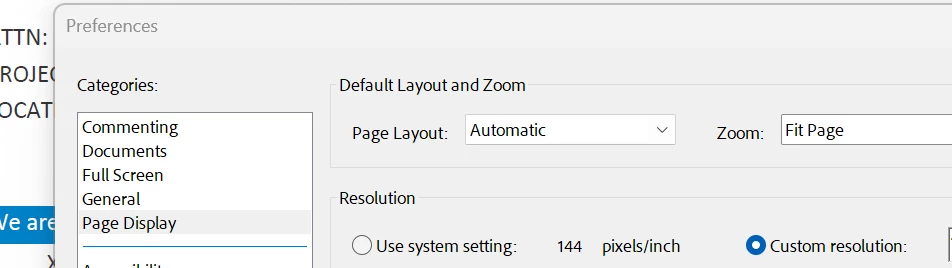
    Reset Page Display & resolution (most effective)

    • Acrobat > Menu > Preferences > Page Display
    • Set Default Layout to Single Page
    • Set Default Zoom to Fit Page
    • Set Resolution to Use System Setting (120 PPI)
    • Restart Acrobat

    Check the screen scaling setting

    • Acrobat > Menu > Preferences > General
    • Scale for screen resolution > Auto‑Detect
    • Restart Acrobat
    • Some PDFs are saved to resize the window or open at a specific magnification
    • Check Menu > Properties > Initial View on affected PDFs


    You can also refer to this Adobe article: Viewing PDFs and viewing preferences.

    I hope this helps.

    Regards,

    Anand Sri.

    jasqidAuthor
    Participating Frequently
    February 11, 2026

    Unfortunately, I made adjustments to match your (Most Effective) preferences edits and the issue still persists. I even tried adjusting to Custom Resolution 120PPI and there was no difference.


    AnandSri
    Community Manager
    Community Manager
    February 11, 2026

    Thank you for sharing the details ​@jasqid 

    Is it specific to one PDF, or with all the PDFs? Could you please share the PDF file with us through which you replicate the issue? If yes, please share the file in the Private message section. Click on my user profile and select send message. Please mention this post title in the message.


    Regards,

    Anand Sri.