
January 9, 2018
Answered

Advanced Form Equations

  • January 9, 2018
  • 1 reply
  • 469 views

Hi there,

I have an excel doc that I am trying to turn into a fillable PDF.  I am having problems with one particular equation that's probably easy for somebody with a little more experience.  here is the equation in excel version:
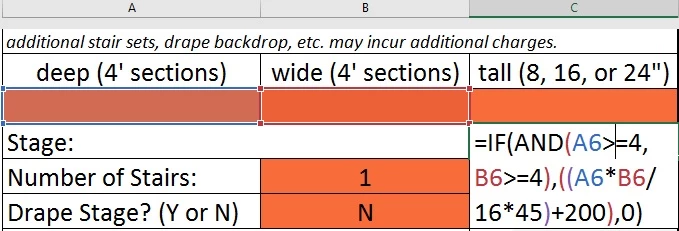
I currently have A6 labeled "depth", B6 labeled "width".  The goal is to have the equation show $0 unless the client inputs a value larger than 4 for each dimension (pseudo hiding the fact that there is a $200 fixed charge).  Is this doable? 

Thanks in advance. 

This topic has been closed for replies.
Correct answer George_Johnson

Yes, but you'll need to use a custom calculation script, something like this:

(function () {

    // Get the input values, as numbers

    var DEPTH = +getField("depth").value;

    var WIDTH = +getField("width").value;

    // Set this field's value

    event.value = WIDTH > 4 && DEPTH > 4 ? 200 + 45 * WIDTH * DEPTH / 16 : 0;

})();

1 reply

George_JohnsonCorrect answer
Inspiring
January 10, 2018

Yes, but you'll need to use a custom calculation script, something like this:

(function () {

    // Get the input values, as numbers

    var DEPTH = +getField("depth").value;

    var WIDTH = +getField("width").value;

    // Set this field's value

    event.value = WIDTH > 4 && DEPTH > 4 ? 200 + 45 * WIDTH * DEPTH / 16 : 0;

})();

January 10, 2018

Thank you SO much!  This worked perfectly once I added the = after the > for each condition. 

Is there also a way to do this with letters instead of numbers?  such as: