Gem Gypsy
Participant
July 2, 2024
Question

Advanced Optimization Compression making font look weird on Adobe DC/Pro

  • July 2, 2024
  • 1 reply
  • 527 views

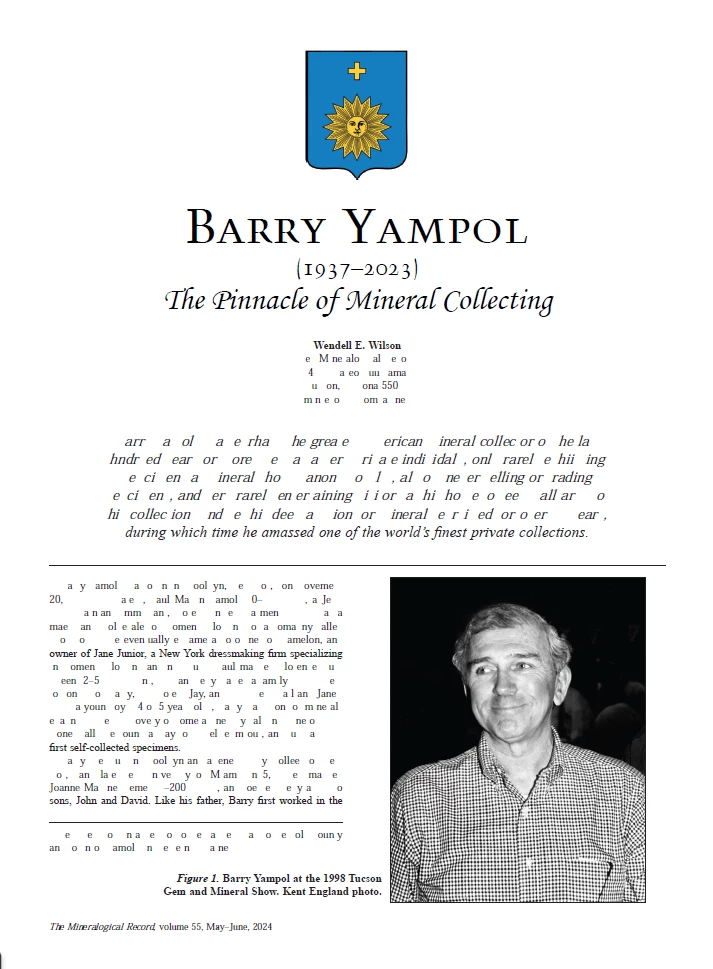
I have been using Adobe DC/Pro for almost 5 years to reduce and combine pdfs.  I use the Advanced Optimization feature as I want to keep the images a certain size so that they can be enlarged to see detail.  All of a sudden, in the past few days, when I try to use this feature to compress, It makes the font all weird.  This doesn't happen when I use the "Single File" feature, just the AO feature.  I have attached a screenshot. This is a file that I compressed with the AO a couple of months ago, and it was fine.  Now it is not.  Nor are any other new files I am trying to compress.
This topic has been closed for replies.

1 reply

Gem Gypsy
Gem GypsyAuthor
Participant
July 4, 2024

The first attachment is what the original pdf looks like.  The second attachement is what I have been using for the AO for the fonts.  There is no problem with the images or the image captions.

Amal.
Legend
July 11, 2024

Hi there


Hope you are doing well and thanks for reaching out.


Have you started experiencing this issue recently? What is the version of the OS and the Acrobat DC you are using? To check the version go to Help > About Acrobat and make sure you have the recent version 24.02.2089x installed. Go to Help > Check for updates and reboot the computer once.
 
Also try to repair the installation from the help menu (Win Only) and see if that works.
 
Please try to reset the Acrobat preferences as described here (https://adobe.ly/3WhUNak)
 
You may also try to create a new test user profile with full admin rights in Win or enable the root account in MAC (https://adobe.ly/3VXz5XI) and try using the application there and check.

Let us know how it goes.


~Amal