Participant
June 20, 2025
Answered

AEM Designer Preview different when viewed in Adobe Acrobat

  • June 20, 2025
  • 1 reply
  • 517 views

Good day. Wanna thank you early. 🙂 

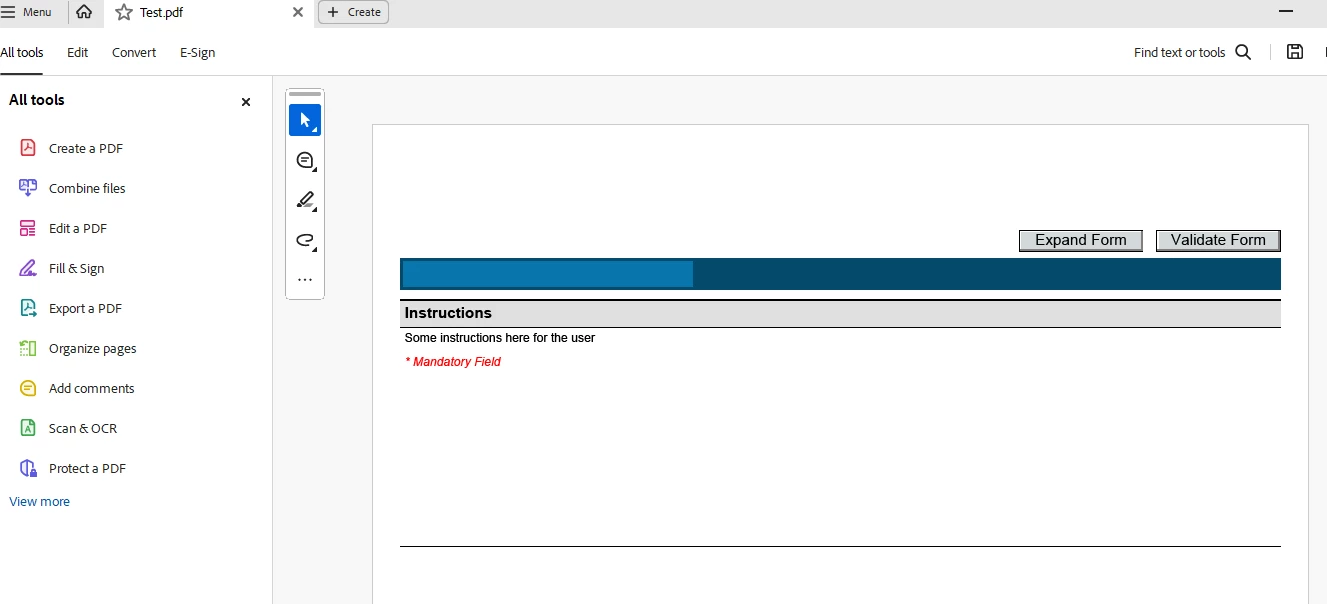
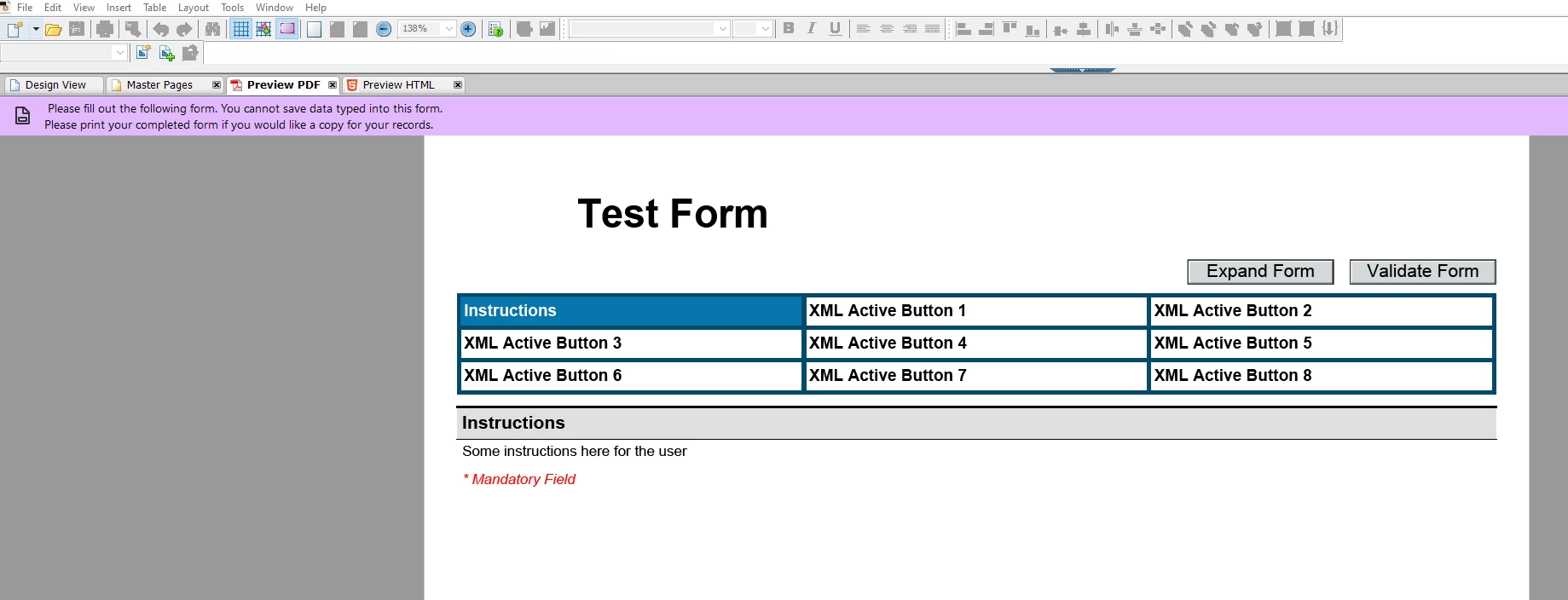
Newbie here. Here's my delima. I frankensteined a form to read the form title and its active buttons from an xml file. This works no issues when viewed on AEM Designer Preview. All buttons are working. But when i view this in Adobe Acrobat or Acrobat Reader, none of the properties show (Form Title and buttons). Any suggestions to remedy the issue? TIA.

See images below
 

Correct answer j._4883

Anand, thanks for you help. I have figured it out. You are absolutely correct about the XML file not being loaded when the PDF file is opened in Acrobat. You would think that the XML will be loaded automatically when opened. I had to manually import my "XML buttons". After I have imported the XML file into Acrobat, saved it and enabled it to Reader... PRESTO! 


Appreciate the help, Anand.


  • Missing or Incorrectly Bound XML Data: 
    Acrobat may not be loading the XML data source properly.
    Fix: In AEM Designer, go to File > Form Properties > Preview > Data File and ensure the XML is embedded or properly referenced.
    Also, check that the XML is embedded in the PDF or loaded via script when opened in Acrobat.


The "Test Form" had been referenced to the proper XML file in AEM Designer.  Now, checking the form in Acrobat whether the XML is embedded, I don't know where to look. 

1 reply

AnandSri
Legend
June 20, 2025

Hello @j._4883


I hope you are doing well, and thanks for reaching out.


In AEM Designer Preview, your form correctly displays:

  • The form title ("Test Form")
  • Buttons like "Expand Form" and "Validate Form"
  • XML-driven buttons labeled "XML Active Button 1" through "XML Active Button 8"

However, in Adobe Acrobat or Acrobat Reader, the form title and the top buttons are missing, even though the rest of the form appears.


Possible Causes & Fixes: 


Dynamic Content Not Set to Initialize on Load: 
AEM Designer can preview dynamic XML content, but Acrobat requires explicit scripting to initialize it.
Fix: Ensure your form has a script in the form: ready or initialize event that binds or redraws the dynamic content.


Missing or Incorrectly Bound XML Data: 
Acrobat may not be loading the XML data source properly.
Fix: In AEM Designer, go to File > Form Properties > Preview > Data File and ensure the XML is embedded or properly referenced.
Also, check that the XML is embedded in the PDF or loaded via script when opened in Acrobat.


Dynamic XFA Forms vs. Static Forms: 
Acrobat supports dynamic XFA forms, but only if they are saved correctly.
Fix: Save the form as a Dynamic XML Form (File > Save As > Dynamic XML Form (*.pdf))


Reader Extensions Not Enabled: 
If you're using Acrobat Reader, some dynamic features may not work unless Reader Extensions are enabled.
Fix: Use Acrobat Pro or ensure the form is extended using Adobe LiveCycle/Experience Manager Forms.


Script Conflicts or Errors: 
A script triggered by the "Use XML" logic might be failing silently in Acrobat.
Fix: Use the JavaScript Console in Acrobat (Ctrl + J) to check for errors when opening the form.


Let us know how it goes.

Thanks,

Anand Sri.

j._4883Author
Participant
June 20, 2025

Thank you, Anand.

Still no luck. Here's what I have done based on your suggestions.


  • Dynamic Content Not Set to Initialize on Load: 
    AEM Designer can preview dynamic XML content, but Acrobat requires explicit scripting to initialize it.
    Fix: Ensure your form has a script in the form: ready or initialize event that binds or redraws the dynamic content.


Not so sure how to do it, but I've looked at the script (in the Designer) and there's the initialization for the xml.


  • Missing or Incorrectly Bound XML Data: 
    Acrobat may not be loading the XML data source properly.
    Fix: In AEM Designer, go to File > Form Properties > Preview > Data File and ensure the XML is embedded or properly referenced.
    Also, check that the XML is embedded in the PDF or loaded via script when opened in Acrobat.


The "Test Form" had been referenced to the proper XML file in AEM Designer.  Now, checking the form in Acrobat whether the XML is embedded, I don't know where to look. 


  • Dynamic XFA Forms vs. Static Forms: 
    Acrobat supports dynamic XFA forms, but only if they are saved correctly.
    Fix: Save the form as a Dynamic XML Form (File > Save As > Dynamic XML Form (*.pdf))


Not an issue.


  • Reader Extensions Not Enabled: 
    If you're using Acrobat Reader, some dynamic features may not work unless Reader Extensions are enabled.
    Fix: Use Acrobat Pro or ensure the form is extended using Adobe LiveCycle/Experience Manager Forms.


Not an issue.


  • Script Conflicts or Errors: 
    A script triggered by the "Use XML" logic might be failing silently in Acrobat.
    Fix: Use the JavaScript Console in Acrobat (Ctrl + J) to check for errors when opening the form.


Not an issue.

j._4883AuthorCorrect answer
Participant
June 23, 2025

Anand, thanks for you help. I have figured it out. You are absolutely correct about the XML file not being loaded when the PDF file is opened in Acrobat. You would think that the XML will be loaded automatically when opened. I had to manually import my "XML buttons". After I have imported the XML file into Acrobat, saved it and enabled it to Reader... PRESTO! 


Appreciate the help, Anand.


  • Missing or Incorrectly Bound XML Data: 
    Acrobat may not be loading the XML data source properly.
    Fix: In AEM Designer, go to File > Form Properties > Preview > Data File and ensure the XML is embedded or properly referenced.
    Also, check that the XML is embedded in the PDF or loaded via script when opened in Acrobat.


The "Test Form" had been referenced to the proper XML file in AEM Designer.  Now, checking the form in Acrobat whether the XML is embedded, I don't know where to look.