
Participant
April 20, 2022
Answered

Afficher un champ automatiquement sur adobe formulaire

  • April 20, 2022
  • 1 reply
  • 1224 views

Bonjour, je ne trouve pas mon bonheur donc je me permets de demander ici.

Je suis en train de créer un formulaire interactif. Dans le premier champ, j'ai inséré une liste déroulante avec des choix de villes comme Lyon ou Paris (il y en a 8 au total). 

Une fois que la personne à sélectionner le lieux, l'objectif est que le formulaire affiche automatiquement le bon numéro de téléphone et mail qui correspond au lieu choisi dans les deux champs suivants : 
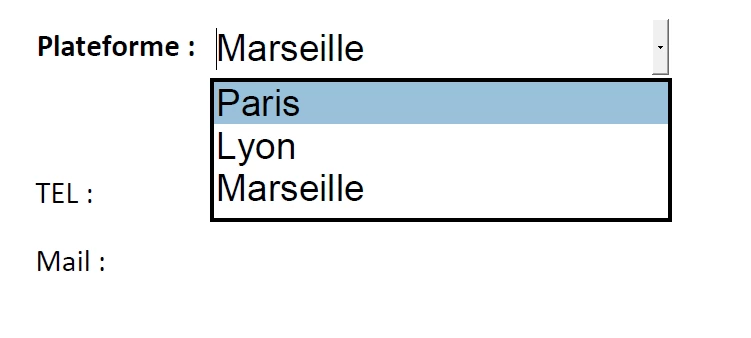
 

Savez vous s'il est possible de programmer cela avec Adobe Formulaire ? 

Merci d'avance pour votre aide 


This topic has been closed for replies.
Correct answer try67

You have to adjust the names of the fields in the code to match the actual names in your file (so "phoneTxt" instead of "Phone", for example), or the other way around.

1 reply

BarlaeDC
Community Expert
Community Expert
April 20, 2022

Hi,


In the Validation tab of the dropdown list you could add a script something like :


// set defaults to empty
var emailTxt = "";
var phoneTxt = "";

// if "Marseille" then set
if ( event.value == "Marseille") {
    var emailTxt = "Marseille@example.com";
    var phoneTxt = "0101010101010";
} else if ( event.value == "Lyon"){
    emailTxt = "Lyon@example.com";
    phoneTxt = "02020202020202";
} else if (event.value == "Paris"){
    emailTxt = "Paris@example.com";
    phoneTxt = "03030303030303";
} // just add extra else if, and change the value between the "".

// actually set the values
this.getField("Email").value = emailTxt;
this.getField("Phone").value = phoneTxt;


Hope this helps.

Participant
April 20, 2022

Hi, 


Thanks you very much for your answer.

I tried to put the code in drop-down list but nothing is displayed...
Maybe the 2 text boxes below are badly configured, you can look ?


Thank you in advance

try67
Community Expert
try67Community ExpertCorrect answer
Community Expert
April 20, 2022

You have to adjust the names of the fields in the code to match the actual names in your file (so "phoneTxt" instead of "Phone", for example), or the other way around.