Inspiring
July 31, 2024
Question

AI assistant is blocking me from doing my work

  • July 31, 2024
  • 2 replies
  • 422 views

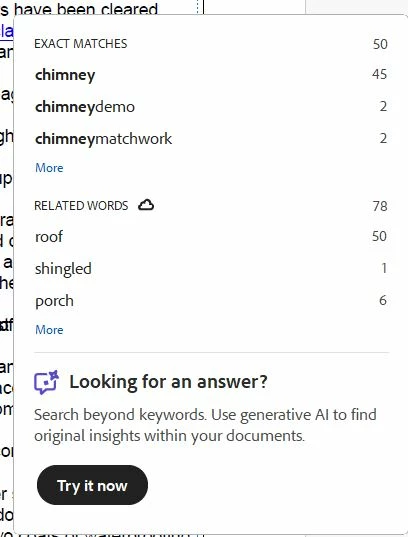
When I ordered acrobat pro I specifically said I did not want AI assistant and after some back and forth the person in help agreed to the request for my subscription. But working with it I see that AI assistant is my Acrobat pro, it pops up suggesting I use it, and after doing a search, now there's a big box covering my page and there's no "close" button or anyway to remove it!  How do I stop this AI assistant from covering my page? I literally cannot work on my document because of it.
This topic has been closed for replies.

2 replies

creative explorer
Community Expert
Community Expert
July 31, 2024

@Peter5E6F did you disable the new Mockup Beta (AI Assistant)? 

m
Peter5E6FAuthor
Inspiring
July 31, 2024

I don't know what that is. I ordered my subscription through chat and at
first the order came with AI assistant. I reiterated I didn't want it and
didn't want to pay for it, and he gave me a new subscription order with AI
assistant removed from the invoice. I assumed the download link given would
have given me Acrobat without AI assistant, but apparently not.


[unrelated link removed by moderator]

Peter5E6FAuthor
Inspiring
July 31, 2024

I just managed to make the box go away by clicking on one of the word matches. I tried doing a search again, but this time there was a search bar above this box with an x "close" button and when I clicked it, both the search bar and this box disappeared, which it did not do before! I can't believe Adobe is making such flaky software.