November 24, 2025
Answered

All tools are gone and replaced with AI tools

  • November 24, 2025
  • 8 replies
  • 2613 views

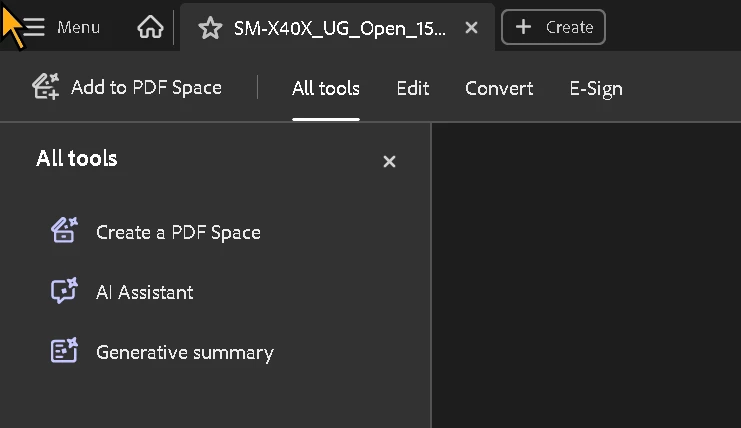
Today whwn I opened Adobe Acrobat Pro DC all my tools in the left panel were gone. Instead of "Edit PDF", "Combine pages", "Prepaire for Accessibility" and so on, I can only se these three items: "Create a PDF space", "AI assistant" and "Generative summary". 

Here's what I have tried in order to get all my tools back:

  • Help -> restore installation
  • Settings -> language
  • Log out from my Adobe accouunt from within Adobe Acrobat Pro DC and then loggein back again.
  • Deleting all Adobe entries from the Windows Registry file

Nothing seems to help. Any idéa or suggestion on how to restore the previous "All tools"-list would be very apprechiated. 


Correct answer JR Boulay

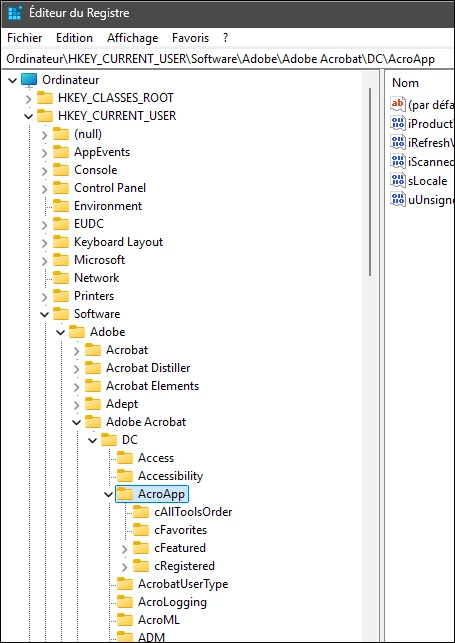
In the meantime, you can delete the ‘AcroAPP’ folder in the registry editor and restart Acrobat.


AcroApp.png

8 replies

December 15, 2025

Ok here's what worked for me on Win 11:

1. Close Adobe and any MS office apps you might have running.

2. Uninstall Adobe Acrobat DC.

3. Open the regedit-app and remove all folders with the exact string "Adobe". I found this in two branches (missed the second one in my previous attempts)

4. Restart your PC.

5. Install Adobe Acrobat again from scratch. If asked, do not import older settings or something similar.


At this point, You might open any random PDF and you'll se the new user interface with all tools to your left side.

(Upvote this post if it solved your problems as well). 

JR Boulay
Community Expert
Community Expert
December 15, 2025

There is no need to uninstall Acrobat.
Deleting all folders named ‘Adobe’ could cause undesirable results if you use other Adobe software.

It is therefore best to delete only the ‘AcroAPP’ folder as indicated above.

HKEY_CURRENT_USER\Software\Adobe\AdobeAcrobat\DC\AcroAPP

Acrobate du PDF, InDesigner et Photoshopographe
December 15, 2025

Hello and thanks for your reply.

In my registry, I did not have any folder named "AcroAPP". Therefore I wiped everything. 

JR Boulay
Community Expert
JR BoulayCommunity ExpertCorrect answer
Community Expert
December 14, 2025

In the meantime, you can delete the ‘AcroAPP’ folder in the registry editor and restart Acrobat.


AcroApp.png

Acrobate du PDF, InDesigner et Photoshopographe
December 15, 2025

Friendly reminder: When posting images containing valuable and important content, please also post that seme info as plain text. Information within images can only be read by a limited group of people.

JR Boulay
Community Expert
Community Expert
December 14, 2025

After more than an hour spent on my computer (and certainly on others), the technical team finally discovered the source of the problem, which should be resolved in the next update.

Acrobate du PDF, InDesigner et Photoshopographe
Participant
December 2, 2025

I have the same issue with my Acrobat Pro DC.

I had been using the new Acrobat interface for months where the "All tools" appear as a pane on the left (i.e. not on the right before New Acrobat user interface was an option). This was a happier time.

Acrobat All Tools.png

Then I had an unrelated problem with my PDF elements flashing uncontrolably and part of the suggested solution for that was to uninstall Acrobat and then to re-install it. (Which incidentally didn't help with the PDF flashes).

Since reinstalling Acrobat, the New Acrobat interface's "All Tools" pane has been reduced to the really unhelpful three AI tools. 

Unhelpful new and reduced "All Tools"

Yes, I know I could resolve this by "Disable New Acrobat", but aside from this very recent strange happening, New Acrobat's user interface is better than the legacy one. I think switching to the legacy interface would be running from the problem not solving it.

Here's the version info if it helps.

Acrobat Version.png

Participant
December 12, 2025

Is there any progress in getting this issue resolved yet? I understand that Adobe might want to be pushing their AI tools, but a pane for "All tools" should contain "All tools" and not leave us having to use the search bar to find the many tools that are no longer considerd part of all.

December 12, 2025

Sad to say but the problem is still unsolved. I have no idea of where to look for additonal help.

November 28, 2025

New update: When I choose the option "Disable new acrobat", all tools are visible to the right. If I then Enable new acrobat", the problem is back. 

Perhaps this is a bug in the software you guys at Adobe should look into a bit more.


@Amal. is there somewhere else where I can adress this problem exept of this forum?

November 27, 2025

Update: The problem seens to be connected to my Adobe account. When I log in using my work account, the tools are hidden, but when loging in using Gmail everything is back to normal. 

JR Boulay
Community Expert
Community Expert
November 26, 2025

Hi @Amal. 

I have the same issue, I don't have an IT Team nor a corporate account:

https://community.adobe.com/t5/acrobat-discussions/acrobat-is-unusable/m-p/15608049#M525606


Acrobate du PDF, InDesigner et Photoshopographe
November 27, 2025

Hello @Amal.

Thank you for your response; you have formed an entirely accurate understanding of my situation.
My IT support team has not made any changes to my account. They simply purchase a batch of licenses from Adobe and then distribute them to us employees, after which we register our products using our email addresses.

I would also like to refer to @JR Boulay ’s comment above. @JR Boulay has an individual license and has encountered the same issue.

As @JR Boulay states in the thread linked in the post above, I am required to use the new interface for reasons that are beyond my control.

Randy Hagan
Community Expert
Community Expert
November 24, 2025

What version number and what flavor (e.g. - Acrobat Pro, Standard, Reader, Premium) are you using? Also, what system are you using Acrobat DC on?


As I open the latest version of Acrobat DC Pro on both my Mac and Windows systems, I don't see anything resembling the screen capture you've submitted. That's not to say that you're not having an issue, only that I can't reproduce the conditions you're describing. A little more information about what version/flavor of Acrobat DC you're using and what you're using it on would help us help you with your issues.


Randy

November 24, 2025

Hello @Randy Hagan and thank you for your quick reply.


I am running Acrobat Pro 2025.001.20937 64 bit on Windows 11. 


I have not done any changes. Closed Acrobat a week ago and this whas what I am seeing when open the program today. 

Randy Hagan
Community Expert
Community Expert
November 24, 2025

I'm happy to try to help.


I have the same version of Acrobat Pro as you, running on a 64-bit Windows 11 system. This is my desktop with a file open:


I have toolsets to the right, and my icons for Thumbnails/bookmarks/attachments and standards are appearing to the left of the document window. There is a little toggle switch/triangle, as shown in the illustration by my cursor in the center of the left-side toolbar, pointing toward the icons showing it is open. If your triangle there points toward the document window, clicking on that should bring your icons back in view.


Hope this helps,


Randy