


John24720114bn5k
Participant
June 18, 2026
Answered

All Tools Blank

  • June 18, 2026
  • 2 replies
  • 87 views

Our entire ORG has the same issue: All Tools is blank.
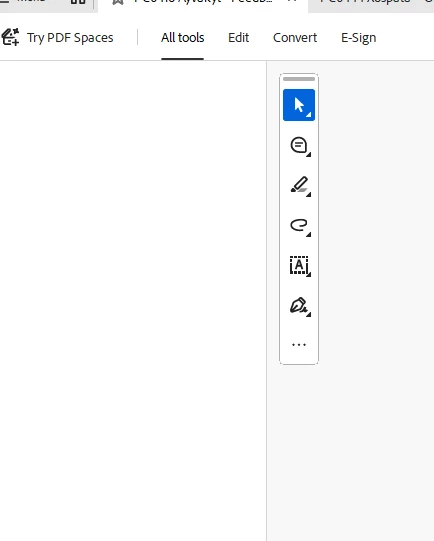
 

    Correct answer Anand Sri Bhattacharya

    Hello ​@John24720114bn5k 


    Thanks for your patience and cooperation on this.


    Please try the following suggestions, and let us know if this fixes the issue for you.

    Please note: Create a backup of the registry settings before making any changes. To create a backup, check this article: https://support.microsoft.com/en-us/topic/how-to-back-up-and-restore-the-registry-in-windows-855140ad-e318-2a13-2829-d428a2ab0692


    • Go to the registry location: "Computer\HKEY_LOCAL_MACHINE\SOFTWARE\Policies\Adobe\Adobe Acrobat\DC\FeatureLockDown"
    • Right-click on the right blank space > select New > DWORD 32-bit value.
    • Rename it to:  bGenCoverPagesLabelStrings
    • Right click on the new value > Click Modify > add the value as ‘1’ (numeric one)
    • Restart the Acrobat and the machine and check the performance.


    Let us know if you experience any issues.

    Regards,

    Anand Sri.

    2 replies

    Anand Sri Bhattacharya
    Community Manager
    Community Manager
    June 18, 2026

    Hello ​@John24720114bn5k 


    Thanks for your patience and cooperation on this.


    Please try the following suggestions, and let us know if this fixes the issue for you.

    Please note: Create a backup of the registry settings before making any changes. To create a backup, check this article: https://support.microsoft.com/en-us/topic/how-to-back-up-and-restore-the-registry-in-windows-855140ad-e318-2a13-2829-d428a2ab0692


    • Go to the registry location: "Computer\HKEY_LOCAL_MACHINE\SOFTWARE\Policies\Adobe\Adobe Acrobat\DC\FeatureLockDown"
    • Right-click on the right blank space > select New > DWORD 32-bit value.
    • Rename it to:  bGenCoverPagesLabelStrings
    • Right click on the new value > Click Modify > add the value as ‘1’ (numeric one)
    • Restart the Acrobat and the machine and check the performance.


    Let us know if you experience any issues.

    Regards,

    Anand Sri.

    Anand Sri Bhattacharya
    Community Manager
    Community Manager
    June 18, 2026

    Hello @John24720114bn5k,


    I hope you are doing well, and thank you for reaching out. We're sorry for the trouble you had with the app.


    We've reported the issue to the product team, and they are working on a fix. We'll share an update as soon as we hear anything new on this. As a workaround, you can disable the new Acrobat UI from Menu > Disable new Acrobat and use the classic Acrobat UI.


    Thanks for your cooperation on this.

    Regards,

    Anand Sri.

    gwen_0936
    Participant
    June 19, 2026

    I am having the same issue when trying to request e-signatures.  I get through placing the signature boxes but then the all tools goes blank and I cannot ‘review & send”.  What is the ETA?

